Author Archives: Shirish Agarwal

About Shirish Agarwal

Shirish Agarwal is the founder of Flow20 and looks after the PPC and SEO side of things. Shirish also regularly contributes to leading digital marketing publications such as Hubspot, SEMRush, Wordstream and Outbrain. Connect with him on LinkedIn.

July 20, 2017

How to Keep Your WordPress Website Safe from Malware and Hacking: Essential Strategies for Protection

To ensure your WordPress website remains safe from malware and hacking attempts, it’s vital to adopt effective security measures. By implementing strong security practices, you can greatly reduce the risk of your site being compromised. The frequency of hacking incidents highlights how crucial it is to protect your online presence. Many website owners overlook basic security steps, leaving their sites vulnerable.

Securing your WordPress site involves a combination of tools and best practices. Installing a reliable security plugin, keeping your themes and plugins updated, and using strong passwords are key steps to fortify your website. Additionally, regularly monitoring your site for suspicious activity can help you quickly identify potential threats.

The good news is that there are numerous resources and strategies at your disposal to keep hackers at bay. Familiarising yourself with common vulnerabilities and learning how to address them can significantly enhance the security of your site. Taking proactive steps today will help safeguard your WordPress website for the future.

Understanding WordPress Security

WordPress security is crucial for protecting your website against malware and hacking. You need to understand the role of secure hosting and the common vulnerabilities that can affect your site.

The Importance of Secure Hosting

Choosing a secure hosting provider is one of the first steps in protecting your WordPress website. A reliable host will offer features such as firewalls, DDoS protection, and regular backups. These features help to prevent unauthorised access and attacks.

When selecting a host, look for one that has a strong reputation for security. You want a provider that applies security patches promptly and provides SSL certificates for encrypting your data.

It’s also wise to choose hosting that offers automatic updates for WordPress core software, plugins, and themes. Such measures can close vulnerabilities before they become an issue. A well-secured host is your first line of defence against cyber threats.

Take your online business to new heights with Flow20! Optimize with our expert eCommerce SEO, expand your reach with Bing PPC services, and dominate Google Ads. Plus, master advertising with our Google Ads training. Act now!

Recognising WordPress Vulnerabilities

WordPress, like any software, can have vulnerabilities. These can exist in the core software or in the plugins and themes you install. Regular updates are essential to patch known weaknesses.

Common vulnerabilities include SQL Injection, where attackers exploit input fields to execute malicious SQL queries. Also, Cross-Site Scripting (XSS) allows attackers to inject harmful scripts into web pages viewed by users.

To protect your site, regularly scan your WordPress files for malicious code. Consider using a security plugin that helps identify issues and offers solutions. Moreover, avoid using outdated plugins or themes, as they can leave your site exposed to threats.

By being proactive and knowledgeable about these vulnerabilities, you can better safeguard your WordPress website.

Strengthening Login Security

To keep your WordPress website safe, it’s crucial to strengthen your login security. Implementing strong passwords, using two-factor authentication, and limiting login attempts are effective ways to protect against unauthorised access.

Implementing Strong Passwords

Strong passwords are the first line of defence against hackers. Your password should be at least 12 characters long and include a mix of uppercase, lowercase letters, numbers, and special characters.

  • Avoid using easy-to-guess information like “password123” or your name.
  • Use a password manager to create and store complex passwords securely.
  • Consider changing your passwords regularly to enhance security.

A well-crafted password makes it much harder for hackers to gain access to your account.

Enforcing Two-Factor Authentication

Two-factor authentication (2FA) adds an important layer of security. With 2FA, you must provide two forms of identification before logging in. This usually includes something you know, like your password, and something you have, like a code sent to your phone.

  • Many WordPress plugins offer simple ways to set up 2FA.
  • It’s crucial to enable this feature, as it significantly decreases the risk of unauthorised access.

Even if your password is compromised, 2FA can prevent hackers from logging in.

Limiting Login Attempts

Limiting login attempts is another effective measure for securing your login page. By restricting the number of times someone can attempt to log in, you reduce the risk of brute force attacks.

  • Set a limit of 3 to 5 attempts before locking the user out temporarily.
  • Many security plugins can automatically implement this feature for you.
  • Consider changing the default admin username, as that can help prevent account guessing.

This strategy can help protect your site from those trying to gain access by guessing passwords.

Regular Maintenance and Updates

Maintaining your WordPress website is essential for keeping it secure from malware and hacking attempts. Regular updates, proper management of themes and plugins, and scheduling backups are key actions that protect your site.

Update WordPress Regularly

You should update WordPress regularly to ensure your site has the latest security features and bug fixes. Each new version of WordPress often includes improvements that enhance safety and performance.

To check for updates, go to your WordPress dashboard. You’ll see notifications prompting you to update the core system. Often, these updates are quick and straightforward. Installing them helps protect against common vulnerabilities exploited by hackers.

Make it a habit to check for updates every week. You might want to enable automatic updates for minor releases to make this process even easier.

Managing Themes and Plugins

Managing your themes and plugins is crucial to maintaining a safe site. Outdated or unused themes and plugins can leave your website open to threats.

You should only keep the themes and plugins that you actively use. Uninstall those that are unused or no longer supported. Regularly updating your active themes and plugins is equally important. Each update usually contains security patches that protect against vulnerabilities.

To manage themes and plugins, visit the “Themes” and “Plugins” sections in your dashboard. You’ll see available updates there. Keep an eye on user reviews and changelogs for any potential issues before updating.

Scheduling Regular Backups

Regular backups are vital for safeguarding your site’s data. In case of malware infection or hacking, having recent backups lets you restore your site quickly.

Choose a reliable WordPress backup solution. Options like UpdraftPlus or BackupBuddy can automate the backup process. Set these solutions to run daily or weekly, based on how often your content changes.

Store backups in multiple locations, such as cloud storage or external drives. This way, your data remains secure even if one backup source fails. Regular backups will give you peace of mind and ensure a quick recovery from potential site issues.

Employing Advanced Security Measures

To protect your WordPress website from malware and hacking, you need to employ advanced security measures. These measures include installing effective security plugins, configuring a web application firewall, and utilising SSL certificates. Each of these steps is crucial in creating a safer online environment for your site.

Installing Security Plugins

A reliable security plugin is vital for safeguarding your WordPress site. Consider using Wordfence or iThemes Security, both of which are among the best WordPress security plugins available.

These plugins offer features like malware scanning, firewall protection, and login attempt monitoring. Installing a security plugin is straightforward; simply search for it in your WordPress dashboard, install, and activate it.

After activation, customise the settings to suit your needs. Many plugins offer options for automatic updates, which keep your security measures up to date without manual input. Regularly review plugin reports to stay informed about potential threats.

Configuring a Web Application Firewall

A web application firewall (WAF) provides another layer of security for your website by filtering and monitoring HTTP traffic. Configuring a WAF can significantly reduce the risk of hacking attempts.

Choose a trusted WAF service that integrates well with WordPress. Many security plugins offer built-in WAF features, simplifying the process.

Once installed, you will need to set rules for how traffic is handled. This includes blocking suspicious IP addresses, restricting access to certain files, and enabling logging for monitoring purposes. Regularly review and adjust the WAF rules as necessary to stay ahead of new threats.

Utilising SSL Certificates

SSL certificates encrypt data exchanged between your website and its visitors. This encryption adds a layer of security that prevents data interception by attackers. A site secured with SSL is indicated by “https://” in the URL.

To utilise SSL, first obtain a certificate from a reliable provider. Many hosting services offer free SSL options, such as Let’s Encrypt.

After obtaining the certificate, enable it through your hosting control panel. Once activated, update your website links to use HTTPS instead of HTTP. Regularly check your SSL status to ensure it is functioning correctly. This will enhance user trust and improve your site’s search engine ranking.

Maximize your law or finance firm’s potential with Flow20! Our specialized SEO for law, SEO for finance, and PPC for law services are designed to elevate your online presence. Click here to start dominating your industry today!

Monitoring and Protecting Your Website

Keeping your WordPress website safe involves ongoing monitoring and proactive protection measures. Regular checks for malware, user activity monitoring, and preventing brute force attacks are crucial to ensuring your site remains secure.

Checking for Malware

To keep your site safe, you should check for malware regularly. Malware can come in various forms, including viruses, worms, and spyware, each posing serious security risks. You can use security plugins like Wordfence or Sucuri, which scan your site for known malware and vulnerabilities.

Set up automated scans to run weekly. In addition to using plugins, consider manually checking your site’s files for strange changes or unfamiliar code. If malware is detected, you must act quickly to remove it and restore your site from a recent backup.

Monitoring User Activity

Monitoring user activity is essential for maintaining security. You need to track who logs into your site and what actions they perform. Keeping an eye on user behaviour helps in spotting suspicious activities that may indicate a security breach.

Install a user activity monitor plugin that logs login attempts, changes to posts, and new user registrations. If you see too many failed login attempts or unfamiliar IP addresses, take action immediately. Limiting user access to only necessary features can further reduce potential threats.

Preventing Brute Force Attacks

Brute force attacks are a common threat, where hackers attempt to guess your login credentials through repeated attempts. To protect against this, use strong and unique passwords. Encourage your users to do the same.

Implementing a limit on login attempts is also beneficial. Many security plugins allow you to lock out users after several failed attempts. Additionally, consider enabling two-factor authentication. This adds an extra layer of protection, making it harder for attackers to access your site. Regularly updating your login URL can also help prevent brute force attacks.

Optimisation for Enhanced Performance

Optimising your WordPress website is crucial for maintaining performance and security. A well-optimised site not only loads faster but also reduces the risk of hacking and malware attacks.

Improving WordPress Hosting

Your choice of hosting directly affects your website’s speed and security. Secure WordPress hosting options provide greater layers of protection against threats. Look for managed WordPress hosting, as it often includes regular updates and security checks as part of the service.

Consider the following features when selecting your hosting provider:

  • Regular Backups: Ensure your provider offers automatic backups to safeguard your data.
  • SSL Certificate: This adds a layer of encryption for secure data transfer.
  • Scalability: Choose a host that can grow with your site’s traffic demands.

Fast server response times can significantly enhance user experience. Opt for a hosting service that is located geographically close to your target audience to reduce latency.

Utilising Content Delivery Networks

A Content Delivery Network (CDN) helps deliver your website’s content efficiently to users around the world. By distributing your content across multiple servers, it reduces the load on your primary server and speeds up content delivery.

Benefits of using a CDN include:

  • Reduced Latency: Content loads faster for users, improving site performance.
  • Improved Site Reliability: CDNs can handle traffic spikes without crashing your site.
  • Enhanced Security: Many CDNs offer additional security features, including DDoS protection.

Implementing a CDN is relatively straightforward. Choose a reputable provider, set up your account, and follow their integration instructions. This can make a notable difference in both performance and security for your WordPress site.

Creating a WordPress Security Checklist

A strong security checklist is essential for protecting your WordPress website from malware and hacking attempts. This checklist will help you implement key security enhancements and ensure you have a solid backup strategy in place.

Essential Security Enhancements

Start by disabling file editing in the WordPress dashboard. This prevents attackers from modifying your files if they gain access. You can do this by adding define('DISALLOW_FILE_EDIT', true); to your wp-config.php file.

Consider disabling XML-RPC, which is often targeted for attacks. You can do this by adding a plugin or through your theme’s functions.php file. Additionally, change your database prefix to something unique. This can protect against SQL injection attacks.

Limit PHP file execution in directories like /wp-content/uploads/, where it is not necessary. Ensure you manage file permissions correctly. Directories should typically use 755 and files 644. Lastly, disable error reporting and directory indexing to prevent sensitive information from being exposed.

Setting Up a Comprehensive Backup Strategy

A robust backup strategy is a key part of your security plan. Use reliable backup plugins that integrate well with your WordPress site. Look for plugins that allow scheduled backups and store them in a safe location.

You can use cloud services for extra security, ensuring that your backups are offsite. This means that in the case of a security breach, you can restore your content quickly.

It’s also a good idea to log out idle users automatically. This can be done through various plugins, reducing the risk posed by unattended accounts. When choosing a hosting provider, opt for one known for security features.

Need help with your digital marketing, whether that’s Google Ads, Facebook, LinkedIn or Social Media campaigns, get in touch with us today. Or, view all our services here.

May 26, 2017

Is a copywriter a wordsmith or a salesman?

First off, let’s clarify what a copywriter actually is. It’s an individual who writes promotional material. Could be a website, brochure, flyer or press advert – though it’s not limited to just these types of collateral. Or put another way, it’s someone who writes words that sell a product, service or idea.

As much as a slick graphic or image can look enticing, it’s ultimately the words that convinces the reader to make the purchase, or equally, walk away from it. Copywriting can be powerful, very powerful. Regardless of what you might think, it’s a pretty sure bet that you have been convinced by some clever copy at some point.

As a copywriter myself, I’m very often called a ‘Wordsmith’. I once worked for a digital marketing agency where one of the bosses consistently referred to me in this way. Used to drive me nuts. But there are plenty of copywriters who are more than happy to adopt this label. And over the years I’ve realised why that actually is – because as far as I’m concerned, copywriting is about salesmanship.

Here’s why those copywriters like the Wordsmith tag. Ready? Because they’ve never experienced actually selling anything in their lives. They normally would have studied journalism or English Literature – often earning a BA(Hons). They were told that they had a ‘gift for writing stories’. They often didn’t begin their first job until their early twenties – right from leaving university. The thought of selling something actually fills them with dread.

Then, they start as an intern in a marketing or ad agency and begin their career as a copywriter.
In other words, they simply have no tangible experience. In fact, you try Gsalesmanoogling the words ‘salesman’ and ‘copywriter’ together. You’ll find very few copywriters blogging about themselves in this way. On the other hand, I have a very different background. Copywriting is selling, pure and simple. I was selling advertising space at 16 years of age – cold calling. And for twenty years there-after, sold everything from film and jewellery to digital marketing services and handbags.

My advice, when seeking a copywriter for your project, look at a copywriter’s portfolio, then see whose the most persuasive and written from the most unique angle. Nine times out of ten it’ll be the salesman that floats your boat.

So, in short, to answer the question: a copywriter can be both; just be aware that it’s the salesman who’ll invariably knows how to close a deal.

About the author:
Jim Morrissey is a website & marketing copywriter and business development consultant based in Twickenham, London. When he’s not making his clients money, Jim is either playing the guitar or writing a film script.

For help with your digital marketing, whether that’s Google Ads, Facebook, LinkedIn, SEO or Social Media campaigns, get in touch with us today.  We offer training for Google Ads, Facebook ad training course and Instagram ads training course, too. Or, view all our services here.

May 4, 2017

How to Tweak Your Remarketing Campaign to Increase ROI – Part 2

If you are looking to tweak your remarketing campaign to incorporate better practices, you might need a more focussed approach. In Part 1 of this look at remarketing to increase ROI, we looked at reshaping the campaign from its foundations.

Now we intend to look a little deeper and identify a few of the practices that contribute to a sustainable remarketing campaign.

More Tips on Creating a Successful Remarketing Campaign

1. Be Specific with Your Bids

Your bids determine which users will see your remarketing ads, so it is important to tell Google exactly who you want to see the most ads. Remarketing is, after all, about reconnecting with the users who have clicked off your site. But, you need to prioritise the users which are more likely to become customers.

Users who bounced off your home page, for example, aren’t quite as likely to become customers as the ones who abandoned purchases. You want to prioritise users who were already in the sales funnel and then work backwards from there, especially if your budget is tight.

2. Use Google’s Frequency Cap

Showing the same ad to the same user is dangerous for a few reasons. Firstly, you run the risk of desensitising the user to your ad. If a user sees the same ad enough times, he or she will stop noticing it after a while.

Secondly, showing a user the same ad too frequently might irritate that user to the point of not wanting anything to do with your company.

Lastly, showing the same ad to the same users can have the effect of decreasing your impressions, which isn’t good.

A good way to avoid these scenarios is to use Google’s frequency cap. This prevents the same users from seeing the same ad too frequently and makes sure that your ad is more effective and better seen.

Accelerate your business growth with Flow20! Master eCommerce SEO with our expertise, boost visibility with Bing PPC, and excel in Google Ads. Enroll in our Google Ads training today. Click here to supercharge your digital strategy!

working desk

3. Schedule Your Ads

Planning a first-class ad strategy is only useful if your ads are going to be seen. And, if they’re going up when your target audience isn’t online, your strategy isn’t going to be as effective as it could be. This is where ad scheduling comes in very handy.

Scheduling your ads means that you can choose when your ads go up. So, if you know your target audience’s online habits, you can ensure that your ads always go up when they’ll be most effective.

4. Change Your Ad Intermittently

If you are running a special offer or discount, you want to show your ad at a higher frequency so as to have the biggest effect over the short period of your promotion. But, as we mentioned with ad frequency, you can start to annoy users through ad overuse.

However, you want your promotion to boost sales over this period. So, if you see your click-through rates dropping off, you might consider changing your ad’s content. This way, users will still be seeing the ad as much, but it will be fresh and thus better-received.

Transform your practice’s reach with Flow20’s bespoke SEO for law, SEO for finance, and PPC for law services. Enhance your digital marketing for law and finance. Click here to claim your market leadership today!

5. Retarget to the Converted

Users who have bought from you in the past are likely to become repeat customers. But, again, you don’t want to annoy them into distancing themselves from your brand. So, instead of aggressively remarketing to these users, you might place them on a less frequent list with a longer duration. This way you’ll subtly keep reminding them of their experience with your business and hopefully generate future sales.

Remarketing Means a Second Chance to Convertarrow

No business wants to see its bounce rate increase. But, with remarketing, bounce rate means an opportunity to reconnect with users who didn’t quite get your approach the first time around.

By carefully planning your strategy, it is possible to find other ways to impress users and show them exactly why they should give your business a second chance.


Conclusion

Remarketing campaigns can help increase your paid search spend ROI but only if you optimise them regularly. Make sure you don’t forget about them when setting up your Pay Per Click (PPC) digital marketing campaigns.

For help with your digital marketing, whether that’s Search Engine Optimisation, Google Ads, Facebook, LinkedIn or Social Media campaigns, get in touch with us today. Or, view all our services here.

Flow20 now also offers training for Facebook ads  and Instagram ads courses.

March 31, 2017

How to Tweak Your Remarketing Campaign to Increase ROI Effectively

Remarketing campaigns are a crucial part of digital marketing that can significantly improve your return on investment (ROI). To increase your ROI, focus on optimizing your remarketing strategies by analysing user behaviour and tailoring your ads accordingly. This approach will help you reconnect with potential customers who have already shown interest in your products or services.

By effectively targeting users through tailored ads, you can boost your conversion rates. Adjusting your messaging to meet the specific needs and interests of your audience can create a more engaging experience. Remember, the key to successful remarketing lies in persistence and strategic adjustments.

Utilising data from previous interactions, you can refine your campaigns and ensure they resonate with your audience. This not only enhances brand awareness but also encourages users to reconsider your offerings, ultimately leading to more conversions and a higher ROI.

Understanding Remarketing and Its Importance in Digital Marketing

Remarketing is a digital marketing strategy that helps you reconnect with users who have previously engaged with your brand. This approach is vital for boosting brand awareness and enhancing the chances of conversion.

Why is Remarketing Important?

  1. Reconnect with Existing Customers: Remarketing allows you to remind previous visitors about your products or services. This can encourage them to return and complete their purchase.
  2. Improve Brand Recall: By seeing ads tailored to them, your audience begins to remember your brand. This repeated exposure can help keep your business top-of-mind.
  3. Target Audience Engagement: You can refine your ads to reach specific segments of your target audience based on their behaviour. This personalisation makes your marketing more relevant and engaging.

Take your online business to new heights with Flow20! Optimize with our expert eCommerce SEO, expand your reach with Bing PPC services, and dominate Google Ads. Plus, master advertising with our Google Ads training. Act now!

The Customer Journey

People often don’t make a purchase on their first visit. Remarketing ensures you stay in touch throughout the customer journey, nudging them towards conversion.

Effective Remarketing Campaigns

A successful remarketing campaign might include:

  • Customized ads based on user interactions
  • Dynamic content that showcases products users viewed
  • Exclusion strategies to filter out those who have converted

By leveraging these strategies, you can increase your ROI and make your marketing efforts more effective.

Identifying and Segmenting Your Target Audience

Understanding your target audience is essential for a successful remarketing campaign. Effective segmentation allows you to tailor your messaging, making it more relevant and impactful for each group. This leads to better engagement and, ultimately, a higher ROI.

Audience Segmentation Techniques

To enhance your remarketing efforts, you can use various audience segmentation techniques. Here are some key methods:

  • Demographic Segmentation: Focus on characteristics like age, gender, income, and education. This helps you create campaigns that resonate based on personal attributes.
  • Geographic Segmentation: Target users based on location. Understanding local preferences can improve engagement in specific regions.
  • Psychographic Segmentation: This involves segmenting based on interests, values, and lifestyles. Tailoring messages to align with these personal factors can increase connection.
  • Behavioural Segmentation: Analyse customer behaviour, such as purchase history and online activity. This data helps you focus on users showing interest in your products or services.

Using these techniques lets you create personalised and relevant campaigns, improving your chances of conversion.

Utilising Google Analytics for Better Targeting

Google Analytics is a powerful tool for refining your audience segmentation. Here’s how you can use it:

  • Audience Reports: Examine reports to understand visitor demographics and interests. Use this information to build detailed audience profiles.
  • User Behaviour Tracking: Identify how users interact with your site. Look at metrics like bounce rates and session durations for insights on which segments engage effectively.
  • Goal Tracking: Set up conversion goals to measure the effectiveness of your remarketing campaigns. This data informs you about which segments convert best.
  • Custom Segments: Create custom segments suited to your specific marketing goals. You can analyse different visitor groups to see how they respond to your campaigns.

By leveraging Google Analytics, you can make informed decisions that enhance your targeting efforts and boost your campaign’s effectiveness.

Designing Compelling Creative and Messaging for Remarketing Ads

Creating effective remarketing ads requires careful attention to ad creative and messaging. Personalisation and strong calls-to-action (CTAs) are key to engaging your audience and driving conversions.

Creating Personalised Ad Content

Personalised ads are more likely to capture attention. Use data from previous interactions with your audience to tailor the content. For instance, display products or services that users viewed but did not purchase.

Incorporate their names or preferences if possible, making the ads feel more relevant. Use dynamic ads where the content automatically adjusts based on user behaviour.

You can also segment your audience into groups based on their previous actions, creating specific ads for each segment. This way, you address their unique interests and needs directly.

Best Practices for Display Ads and CTAs

Your display ads should be visually appealing and straightforward. Use high-quality images and clear, concise text. Ensure the layout is clean and easy to navigate.

Incorporating a strong CTA is crucial. Phrases like “Shop Now”, “Learn More”, or “Get Your Discount” can encourage action. Make the CTA button stand out with contrasting colours and larger fonts.

Keep in mind that ad frequency matters. Avoid overwhelming users with the same ad, as this can lead to ad fatigue. Rotate different creatives and test which messages resonate best over time for maximum effectiveness.

Optimising Landing Pages to Improve Conversion Rates

To enhance the effectiveness of your remarketing campaigns, optimising landing pages is crucial. Focus on A/B testing to assess different versions and consider personalisation to cater to individual visitor needs. These strategies can significantly boost your conversion rates.

A/B Testing for Higher Performance

A/B testing allows you to compare two versions of a landing page to see which performs better. Start by changing one element at a time, like the headline, call-to-action (CTA), or images. By keeping other factors constant, you can accurately measure the impact of each change.

Use tools like Google Optimize or Optimizely to conduct your tests. Ensure you collect enough data for reliable results. Aim for a clear conversion goal, such as signing up or making a purchase. Analyse the data to learn which elements resonate with your audience.

Keep testing regularly to refine your landing pages. Even small tweaks can lead to higher conversion rates, enhancing your ROI on remarketing campaigns.

Personalised Landing Page Strategies

Personalised landing pages make your visitors feel special. By tailoring content to their interests or past behaviours, you increase engagement and the likelihood of conversion. Use data from previous interactions to create these targeted experiences.

Start by segmenting your audience based on criteria such as demographics or preferences. Create variations of your landing page that address these segments specifically. For example, if a visitor has shown interest in a particular product, highlight that product prominently on the landing page.

Incorporate personalised elements like customised messages or offers. This directs visitors to the information most relevant to them, increasing their chances of taking action. The more personal your approach, the higher the conversion rates you can expect.

Leveraging Technology and Data for Advanced Remarketing

Using technology and data effectively can significantly enhance your remarketing campaigns. By integrating advanced techniques like machine learning and predictive analytics, you can gain valuable insights and refine your strategies for better returns.

Machine Learning in Retargeting Efforts

Machine learning can transform your remarketing efforts by analysing customer behaviour. This technology processes large volumes of data to identify patterns that can inform your advertising strategies.

Benefits of Machine Learning:

  • Audience Segmentation: Create precise segments based on user behaviour.
  • Ad Optimisation: Adjust bids and budgets automatically for the best-performing ads.
  • Personalisation: Tailor messages to fit individual user preferences.

By implementing machine learning, you can enhance targeting and increase conversion rates. It enables you to reach the right audience with the right message at the right time.

Predictive Analytics to Anticipate Customer Behaviour

Predictive analytics uses historical data to forecast future behaviour. This can be particularly useful in remarketing, as it allows you to understand what customers are likely to do next.

How to Use Predictive Analytics:

  1. Identify Trends: Spot patterns in user interactions over time.
  2. Customer Lifetime Value (CLV): Estimate how much a customer will spend, helping you allocate resources effectively.
  3. Optimise Timing: Determine the best times to re-engage customers based on their past behaviours.

By integrating predictive analytics, your campaigns become data-driven. You can make informed decisions that enhance customer engagement and boost ROI.

Implementing Frequency Capping and Ad Scheduling

Effectively managing how often your ads appear and when they are shown is vital for the success of your remarketing campaign. By setting frequency caps and scheduling your ads strategically, you can improve engagement and boost your return on investment (ROI).

Balancing Frequency and Engagement

Frequency capping helps you control how often your ads reach the same user. This is essential to prevent ad fatigue, which occurs when users see the same ad too many times. Studies show that 3 to 5 impressions per week is often ideal for maintaining interest without causing annoyance.

To set the right frequency cap:

  • Define Your Goals: Determine what you want to achieve with your campaign.
  • Monitor Engagement Metrics: Check metrics like click-through rate (CTR) and conversion rate to gauge how users respond to your ads.
  • Adjust as Needed: If you notice a drop in engagement, consider lowering the frequency cap.

Careful management of ad exposure can lead to better brand recall and a more positive experience for your audience.

Strategic Timing for Ad Delivery

Ad scheduling allows you to deliver your ads at times when your audience is most likely to engage. Understanding the habits of your target audience is key here. You might find that certain days or times yield better results.

To maximise effectiveness, follow these steps:

  • Analyse User Data: Use analytics to find peak engagement times for your audience.
  • Experiment with Timing: Test different time slots and days to see what works best.
  • Set Up Ad Schedules: Use your advertising platform’s tools to automate when your ads show based on your findings.

This approach helps you reach users when they are more receptive, enhancing the impact of your remarketing efforts.

Analysing and Interpreting Key Remarketing Metrics

Understanding key metrics in your remarketing campaign is essential for boosting ROI. By focusing on ad performance and specific financial return indicators, you can fine-tune your strategy effectively.

Essential Ad Performance Metrics

To gauge your remarketing campaign’s success, monitor these crucial metrics:

  • Click-Through Rate (CTR): This shows how many people clicked your ad compared to those who saw it. A higher CTR indicates more engaging ads.
  • Conversion Rate: This is the percentage of visitors who take the desired action after clicking on your ad. Tracking this helps identify how well your ads drive sales or sign-ups.
  • Cost Per Acquisition (CPA): This metric tells you how much you spend to acquire a customer. Keeping your CPA low while maintaining a high conversion rate is vital for profitability.
  • Cart Abandonment Rate: Knowing how often customers leave items in carts without purchasing helps you improve your sales funnel.

Regularly analysing these metrics enables you to adjust your campaigns based on real performance data.

Maximize your law or finance firm’s potential with Flow20! Our specialized SEO for law, SEO for finance, and PPC for law services are designed to elevate your online presence. Click here to start dominating your industry today!

ROI and Conversion Attribution

Return on Investment (ROI) and conversion attribution are key to understanding your campaign’s financial success.

  • Calculating ROI: To determine your ROI, subtract your marketing costs from the revenue generated. Then divide that figure by the marketing costs. A solid ROI means your campaigns are effective.
  • Return on Ad Spend (ROAS): This specific measure helps you understand how much revenue you earn for each pound spent on ads. A stronger ROAS means better ad performance.
  • Attribution Models: Depending on the model you choose, different channels may receive credit for conversions. Understanding which models work best for your campaigns helps allocate resources effectively.

Utilising these insights can lead to more informed decisions, maximising your return from remarketing efforts.

Integrating Remarketing with Overall Marketing Strategy

A strong remarketing campaign works best when it complements your entire marketing strategy. By integrating remarketing with other efforts like SEO, content marketing, social media, and email marketing, you can enhance your reach and effectiveness.

Synergies with SEO and Content Marketing

To amplify your remarketing efforts, align them with your SEO and content marketing strategies. Quality content that ranks well in search engines can draw in new visitors. When these users explore your site but do not convert, remarketing can remind them of your offerings.

Use targeted keywords that resonate with your audience. This approach enables your ads to connect with users during different stages of their journey. For example, if someone reads a blog post, you can serve them ads tailored to that content. This reinforces your brand and encourages conversions.

Consistency in messaging is crucial. Ensure that your ad visuals and texts reflect the same themes and tone as your content, creating a seamless experience for users.

Social Media and Email Marketing Integration

Integrating remarketing with social media and email marketing can significantly boost engagement. For social media, use remarketing to target users who interacted with your posts or website. This keeps your brand in front of potential customers, increasing the chances of a sale.

In email marketing, consider segmenting your audience based on past behaviours. Send tailored campaigns that remind them of products they viewed or topics they engaged with. Personalised emails can reignite interest and prompt action.

Additionally, combine these efforts. For example, run social media ads that promote your latest email campaign. This creates a multi-channel strategy that connects different touchpoints and enhances your overall marketing strategy.

Scaling and Evolving Your Remarketing Campaigns

To improve your remarketing campaigns, consider expanding to new platforms and audiences, as well as utilising dynamic remarketing strategies. This ensures your ads reach the right people, increasing engagement and return on investment.

Expanding to New Platforms and Audiences

You should explore additional platforms like LinkedIn, Facebook, and Instagram. Each platform has unique user bases and ad formats. For instance, LinkedIn is ideal for B2B audiences, while Instagram is effective for visually appealing products.

Consider using lookalike audiences as well. These audiences are similar to your existing customers, which helps you target more potential buyers.

Make sure to tailor your ads according to each platform’s requirements. This includes adjusting visuals, messaging, and call-to-actions to maximise impact.

Dynamic Remarketing and Personalised Strategies

Dynamic remarketing is vital in enhancing your campaigns. This method displays personalised ads based on users’ past interactions with your site. With dynamic remarketing ads, you can show specific products that potential customers viewed, increasing the chances of conversion.

You should also implement tailored ads that address users’ behaviours and preferences. These personalised strategies help you connect with your audience more effectively.

Using Google Ads and Facebook Ads, you can create tailored experiences by leveraging data from previous interactions. These ads keep relevant products in front of users, nudging them towards a purchase and improving your campaign’s performance.

For help with your digital marketing campaigns, whether that’s Google Ads, Facebook, LinkedIn or Social Media, get in touch with us today. Or, view all our services here.

Flow20 now also offers training for Facebook ads  and Instagram ads courses.

March 15, 2017

Best Practices for Optimising for Cross-Device Conversions

Think back to the last time you made an online purchase. Chances are, you started the research process on one device and ended up making the purchase from another. A large number of users begin a transaction on one device and complete it on another.  This, very simply, is cross-device conversion.

Because users feel comfortable moving between devices it is important for businesses to be able to measure and, more importantly, act on this behaviour.  Designing apps and sites that facilitate cross-device conversions is the first step, but how do you optimise for such conversions?

Here are a few tips:

Tablet and mobile on sofa

How to Optimise for Cross-Device Conversions

1.     Monitor Your Cross-Device Conversions

Conversion tracking allows you to manage and monitor your PPC campaign’s conversion and, as of 2015, this is available for cross-device conversions.  Enabling this on your account will let you see important data on the conversions of multi-device users.

It is also important to enable the same conversion tracking settings across your platforms (desktop sites, mobile sites, and apps).  Conversion tracking gives you information on what customers do after they click on your ads, so uniform tracking will give you will have better understanding of which users are transferring to different devices after said clicks.

Lastly, it will benefit you to take advantage of Google’s expanded conversion window.  A conversion window is the amount of time between a customer clicking an ad and Google reporting a conversion to you.  By lengthening this window, you give customers more time to transact via multiple devices.  And, since multi-device users tend to take longer to convert, you allow yourself a better understanding of the data surrounding these conversions.

Accelerate your business growth with Flow20! Master eCommerce SEO with our expertise, boost visibility with Bing PPC, and excel in Google Ads. Enroll in our Google Ads training today. Click here to supercharge your digital strategy!

2.    Single Out the Insights You NeedConversions graph

March saw the beginning of a rollout in which Google will include cross-device conversions in the ‘Conversions’ column.  But, while this will contribute to the overall conversions on Insights, you will still be able to view data on cross-device conversions separately.  Viewing these insights separately will allow you to specifically target cross-device conversions using automated bidding.

It is also possible to view the conversion rate on individual devices.  This makes it possible to define which approaches are preferred for each device.

3.    Adjust Your Strategy to Maximise Cross-Device Conversions

It is worth noting that users are more likely to complete transactions if the path to completion is clear and easy.  So, you want to make cross-device conversions just as easy as same-device purchases in order to increase your revenue.

With this in mind, use the information in your ‘Conversions’ column to rethink your Google AdWords bids.  This way your strategy will be aimed at boosting cross-device conversions and you will be tailoring the journey to the multi-device user.

Transform your practice’s reach with Flow20’s bespoke SEO for law, SEO for finance, and PPC for law services. Enhance your digital marketing for law and finance. Click here to claim your market leadership today!

Tracking cross device conversions on Facebook

Facebook conversions graphic

Conclusion – Cross-Device Conversions Help You Land More Customers

With so many devices on the market nowadays, users are branching out when it comes to online purchasing.  Device mobility allows a fluidity that really suits many users’ lifestyles, so companies that adapt to and facilitate this have a better chance of winning those users’ business.

With cross-device conversions becoming increasingly popular, now is the time to optimise your ad campaigns to suit them.

For help with your digital marketing campaigns, whether that’s Google Ads, Search Engine Optimisation (SEO), Facebook, LinkedIn, or Social Media, or if you are looking for a professional landing page design agency, get in touch with us today. Or, view all our services here.

Flow20 now also offers training for Facebook ads  and training for Instagram ads.

Https key January 18, 2017

Why It’s Now More Important than Ever to Use a HTTPS Protocol: A Guide to Securing Your Website

The internet is a vast space, and ensuring your website is secure is crucial for both you and your users. Using HTTPS is vital because it protects the privacy and security of information shared between your web browser and your website. As cyber threats become more common, having a secure connection helps build trust with your visitors and protects your brand’s reputation.

When your website uses HTTPS, data is encrypted during transmission. This means that any information exchanged, such as personal details or payment information, is safe from prying eyes. As you navigate online, browsers increasingly favour secure sites, making it essential for your website to adopt HTTPS to enhance usability and search rankings.

Introducing HTTPS to your website may seem daunting, but it’s a straightforward process. By obtaining an SSL certificate and correctly configuring your site settings, you can ensure that your online presence is secure. Embracing HTTPS not only safeguards data but also shows users that you value their security and privacy while browsing your site.

The Evolution of Web Security

Web security has developed significantly over the years, adapting to new threats and improving data protection. Understanding this evolution helps you grasp why using HTTPS is essential for your website.

From HTTP to HTTPS

The original standard for web communication is HTTP, or Hypertext Transfer Protocol. While HTTP allowed data transmission over the internet, it did not encrypt this data. As threats grew, it became clear that users needed more protection.

In response, HTTPS was introduced. The “S” stands for “Secure” and means that data sent between your browser and the web server is encrypted. This reduces the risk of eavesdropping and data tampering. Transitioning to HTTPS also boosts trust; users feel safer on a secured website. Today, many browsers warn against using HTTP sites, pushing an upgrade to HTTPS.

Drive unparalleled digital success with Flow20. Enhance your eCommerce SEO with our expertise, leverage Bing PPC services, and conquer Google Ads. Don’t miss our Google Ads training to sharpen your skills. Click to start now!

Understanding SSL/TLS

SSL, or Secure Sockets Layer, was the first protocol designed to secure internet communication. It ensures data stays private during transit. However, SSL has been largely replaced by TLS, or Transport Layer Security, which offers improved security features.

Both protocols work by establishing a secure channel between your web server and users. They encrypt data to keep it safe from unauthorized access. TLS, being more advanced, provides stronger encryption methods and authentication processes. As you build your website, implementing TLS through HTTPS ensures that both you and your users are protected against cyber threats.

Why HTTPS is Critical for Online Security

HTTPS plays a vital role in safeguarding your online presence. It ensures that sensitive information remains private, protects against cyber attacks, and upholds data integrity. Each aspect is crucial for ensuring a secure browsing experience.

Protecting Sensitive Information

When you use HTTPS, your data is encrypted during transmission. This means that anything you send, like passwords or credit card numbers, is scrambled and becomes unreadable to attackers.

Encryption relies on two keys: the public key, which anyone can see, and the private key, known only to your server. This system makes it very difficult for hackers to capture sensitive information as it travels across the internet. With a valid SSL certificate, your website can reassure users that their information is secure.

Preventing Data Breaches and Cyber Attacks

HTTPS is essential for thwarting data breaches and cyber attacks. Cybercriminals often exploit non-secure connections, making it easier for them to intercept data.

By implementing HTTPS, you significantly reduce the risk of these attacks. Secure connections, backed by SSL/TLS protocols, prevent unauthorised access to sensitive information. This gives your users confidence that their data is protected while navigating your website.

Ensuring Data Integrity and Privacy

Ensuring data integrity means that information sent and received remains unchanged during transmission. HTTPS checks for any alterations and helps to verify that content is accurate and complete.

Privacy is also heightened with HTTPS, as it prevents eavesdroppers from monitoring user activity. This is particularly important in public spaces, like coffee shops or airports, where unsecured Wi-Fi networks are common. By using HTTPS, you maintain both the integrity of your website and the privacy of your users, fostering trust and encouraging safer online interactions.

Implementing HTTPS on Your Website

To secure your website with HTTPS, you need to obtain and install SSL certificates, configure your web server correctly, and set up 301 redirects from HTTP to HTTPS. These steps ensure that your website not only encrypts data but also guides users smoothly to the secure version of your site.

Obtaining and Installing SSL Certificates

The first step is to obtain an SSL certificate from a recognised certificate authority (CA). Popular CAs include Let’s Encrypt, DigiCert, and Comodo. When choosing a CA, consider factors like cost, customer support, and types of certificates available.

Next, after purchasing, you will need to generate a Certificate Signing Request (CSR) on your web server. This involves creating a public-private key pair. The public key is included in the CSR that you send to the CA.

Once verified, the CA will issue your SSL certificate. Install the certificate on your web server following the CA’s instructions. After installation, test the setup using online tools to ensure that it is correct and functioning.

Web Server Configuration Best Practices

Configuring your web server correctly is vital for the effectiveness of HTTPS. Common web servers like Apache and Nginx have specific settings you need to apply.

Set your server to use strong protocols such as TLS 1.2 or 1.3. Disable outdated protocols like SSL 2.0 and 3.0.

Use modern cipher suites that provide better security and performance. This helps protect against vulnerabilities while using HTTPS. You can refer to resources like the SSL Labs for checking your server configuration.

Lastly, enable HTTP Strict Transport Security (HSTS) which forces browsers to connect via HTTPS for a specified period. This is crucial for protecting users from downgrade attacks.

Performing 301 Redirects from HTTP to HTTPS

To ensure that your visitors always use the secure version of your site, set up 301 redirects from HTTP to HTTPS. This tells search engines and browsers that the page has permanently moved.

In your web server configuration files, add rules for HTTP requests. For Apache, use a .htaccess file, while for Nginx, you will modify the server block.

Example for Apache:

RewriteEngine On
RewriteCond %{HTTPS} off
RewriteRule ^ https://%{HTTP_HOST}%{REQUEST_URI} [L,R=301]

For Nginx, the server block would look like this:

server {
    listen 80;
    server_name yourdomain.com www.yourdomain.com;
    return 301 https://$host$request_uri;
}

Testing the redirects ensures that users are directed to the secure version, which improves user experience and SEO.

The Influence of HTTPS on SEO and Web Traffic

Using HTTPS provides significant advantages for your site’s SEO and can boost your web traffic. With search engines prioritising secure sites, making the switch can have a substantial impact.

Improving Search Engine Ranking

Switching to HTTPS is crucial for improving your search ranking. Since 2014, Google has used SSL as a ranking signal. This means sites that use HTTPS could rank higher in search results compared to those that do not.

Having a secure website shows search engines that you care about user safety. This can lead to increased visibility in search results, helping potential visitors find your site more easily. Therefore, you should consider HTTPS not just as a safety feature, but as a way to enhance your SEO strategy.

Maximize your law or finance firm’s potential with Flow20! Our specialized SEO for law, SEO for finance, and PPC for law services are designed to elevate your online presence. Click here to start dominating your industry today!

Enhancing User Trust and Experience

HTTPS improves user trust, which directly influences web traffic. When visitors see the padlock icon in their browser, they know your site is secure. This reassurance encourages them to stay longer and interact more, reducing bounce rates.

Moreover, a secure site can improve conversion rates. Users are more likely to share personal information or make purchases on a site they trust. By switching to HTTPS, you create a safer online environment that benefits both you and your visitors. This commitment to security can significantly enhance the overall user experience on your website.

Digital Certificates and Authentication

Digital certificates play a crucial role in securing online communications. They help ensure that the parties involved in a transaction are who they claim to be. This process is vital for maintaining trust in online interactions.

Certificate Authorities and Their Role

Certificate Authorities (CAs) are trusted entities that issue digital certificates. They verify the identity of the individuals or organisations requesting a certificate. Once verified, the CA signs the certificate with its private key, confirming that the certificate holder is legitimate.

CAs are essential for maintaining the security of online transactions. Without them, the risk of fraud increases significantly. Users can check the authenticity of a website by looking for the padlock symbol in the browser’s address bar. This symbol indicates that the site has a valid HTTPS certificate issued by a recognised CA.

The Public Key Infrastructure Explained

Public Key Infrastructure (PKI) is the framework that supports digital certificates. It consists of hardware, software, policies, and procedures needed to create, manage, and distribute digital certificates. The PKI allows users to encrypt data and verify identities in a secure manner.

In a PKI system, each certificate contains a public key linked to a private key. The public key can be shared with others, while the private key must remain confidential. When a user attempts to authenticate with a website, the website presents its digital certificate. The user’s device checks this certificate against the trusted CAs in its database. If it matches, a secure connection is established, ensuring that data remains private and secure.

Advanced Security Features of HTTPS

HTTPS provides several advanced security features that greatly enhance data protection during transmission. It not only ensures secure communication but also improves website performance. Understanding these features can help you secure your website more effectively.

Understanding Forward Secrecy

Forward secrecy is a key component of HTTPS that protects your data even if a server’s keys are compromised in the future. It ensures that each session generates unique encryption keys.

This means that even if an attacker captures encrypted data, they cannot decrypt past sessions. It relies on key exchange protocols like Diffie-Hellman to create ephemeral keys that are valid only for the duration of a session.

By implementing forward secrecy, you add an essential layer of security to your website, significantly lowering the risk of data breaches.

The Significance of HTTP/2 and Secure Connection

HTTP/2 is an upgrade from HTTP that is designed for enhanced performance and security. With HTTPS, HTTP/2 provides better data transmission by allowing multiple requests and responses to be handled simultaneously.

This reduces latency and improves loading times. Moreover, HTTP/2 strengthens secure connections by requiring the use of encryption.

With features like header compression and prioritised streams, using HTTP/2 facilitates a faster, more efficient user experience while keeping data secure.

Incorporating these elements is crucial for maintaining both security and performance on your website.

The Role of HTTPS in Compliance and Data Protection

Implementing HTTPS is crucial for ensuring compliance with data protection laws and securing sensitive information. This protocol not only enhances security but also allows organisations to meet important legal requirements.

Navigating GDPR and Data Privacy

The General Data Protection Regulation (GDPR) emphasises protecting personal information. HTTPS plays a vital role in this by encrypting data during transmission. This means that information like names, emails, and payment details are secure from unauthorised access.

By using HTTPS, you also foster trust with your users. Customers are more likely to engage with a website they perceive as secure. Failing to encrypt data can lead to fines and damage to your reputation. Thus, HTTPS helps you comply with GDPR and protect user privacy effectively.

Securing E-commerce Transactions

For e-commerce, HTTPS is not just an option; it’s a necessity. Transactions involve sensitive information, such as credit card numbers and personal data. HTTPS encrypts this data, significantly reducing the risk of breaches.

Without HTTPS, your customers’ information is vulnerable. This can lead to fraud, loss of customer confidence, and financial damage. Online security is paramount in today’s digital marketplace. By adopting HTTPS, you create a safe shopping environment, encouraging users to complete their purchases without fear.

For help with your digital marketing campaigns, whether that’s Google Ads, SEO, Facebook, LinkedIn or Social Media, get in touch with us today. Or, view all our services here.

August 17, 2016

Online Marketing – What you need to know (Aug 16)

Limited use of Google’s keyword planner for low and non spending accounts

The keyword planner is a free tool that has long been a staple in every online marketer’s toolkit whether that’s for SEO or PPC. However, you may soon have only limited access unless you’re using Google’s AdWords platform.Google keyword planner

Whilst this shouldn’t come to most as a great surprise as when all is said and done, Google is an advertising company first and the accuracy of data has always been questionable, this is the primary go-to tool for most marketers and if you’ve only been using it for SEO purposes it may soon be time to find alternatives.

Search Engine Land has more info on this update and if you’re looking for a list of free alternatives to the Keyword planner, check out SEJ.

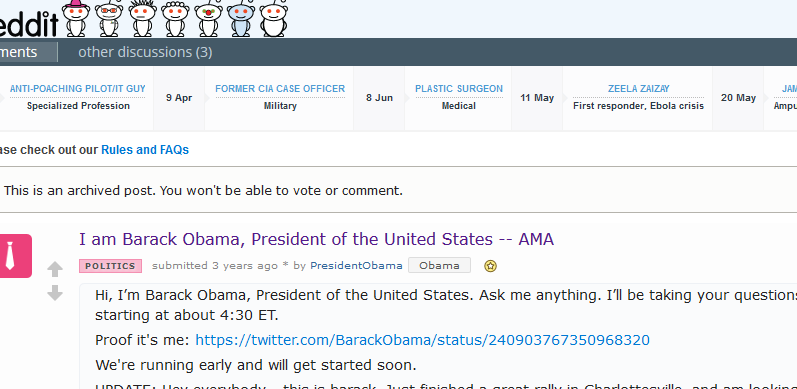
Barack Obama on Reddit

Did you know that Barack reddit screenshotObama has a AMA (Ask Me Anything) account on Reddit? No joke. And, it’s not news per se as he’s had the session going there for 3 years now.

What is new however, is that last week he announced he’d also be reading his Facebook messages personally, a total of 10 (including emails and letters). More on CNBC.

Google My Business Insights

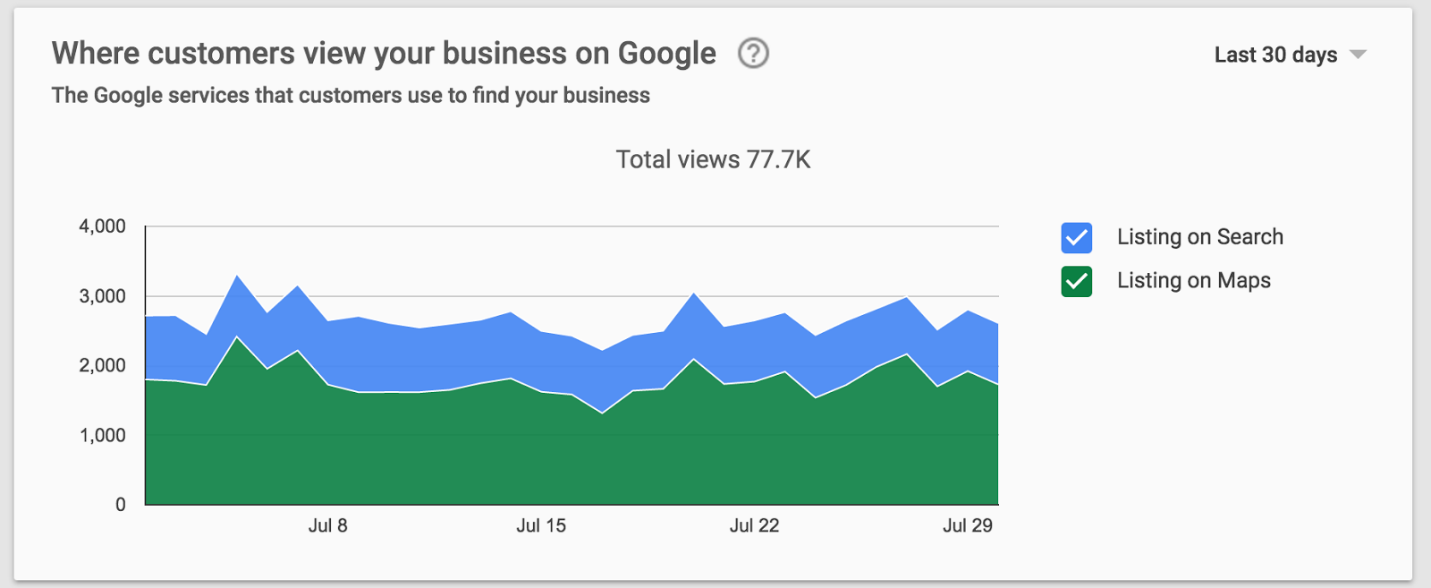
Google My Business is an important marketing channel for any small business, Views on Googlemore so if you have a brick and mortar store.

Last week, Google has given their analytics platform for My Business an upgrade giving page managers much more useful information and insights into their page performance as well as other key elements such as:

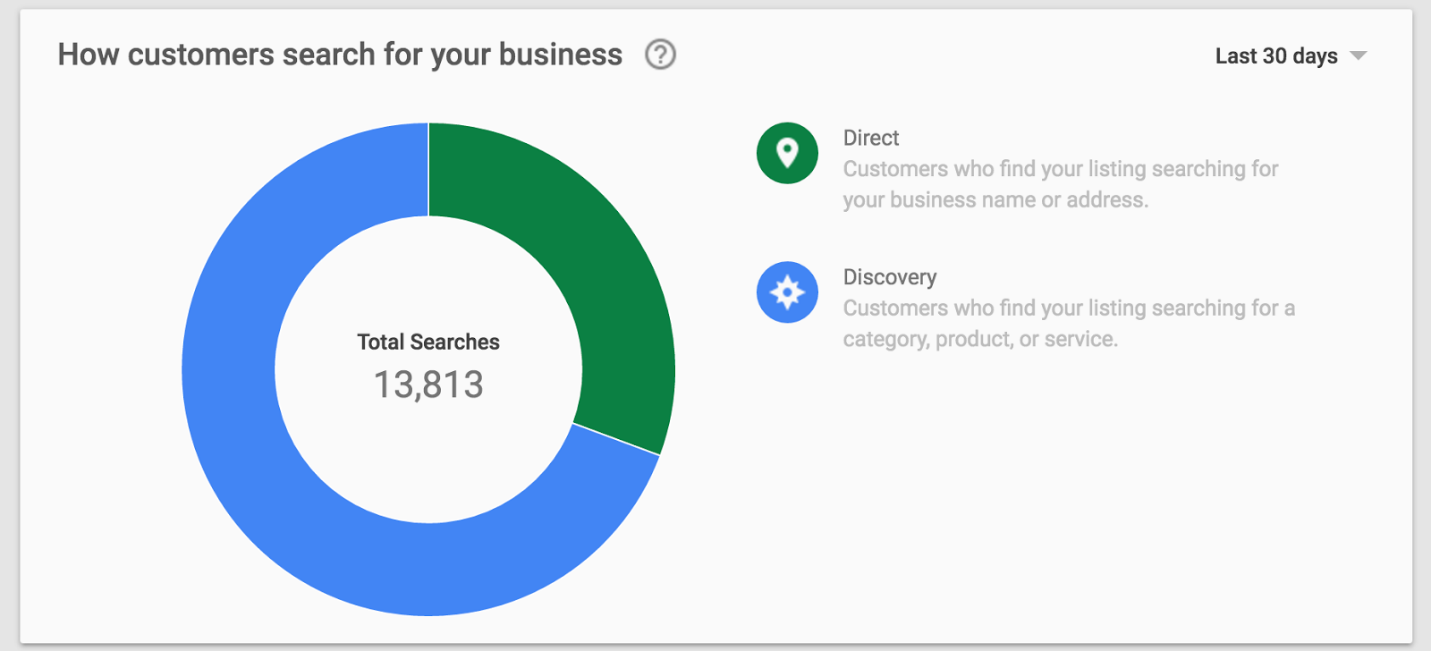
  • How many people are seeing your listingSearches on Google
  • Whether they’re coming from Google search or Maps – this is good as you can use this information to take marketing decisions especially if you’re a restaurant or a local establishment
  • Whether they looked for you directly or found you whilst browsing

Learn more at Google’s official announcement page .

Clinton vs Trump – who is winning in online marketing?

In terms of pure nClinton vs Trumpumbers, Trump leads the way in terms fo number of twitter and Instagram followers and Facebook fans and Clinton is ahead on YouTube and LinkedIn. Engagement metrics however paint a different story.

Head over to Entrepreneur website for the full infographic or click here for commentary on Forbes.

For help with your digital marketing campaigns, whether that’s Google Ads, Facebook, LinkedIn or Social Media, get in touch with us today. Or, view all our services here.

February 22, 2016

Google Ads Removed from the Right: Impacts on Advertisers and Strategies for Adaptation

Google has made a significant change by removing paid ads from the right side of its search results. This shift means that ads are now displayed at the top and bottom of the main results, which can impact how users interact with search items. Advertisers may find that this change increases competition for visibility, making it crucial to refine their advertising strategies to stay effective.

With this new layout, the goal is to enhance user experience by providing more relevant results. However, this could lead to a rise in costs for advertisers as prime ad space becomes more sought after. Understanding how these changes affect your ad performance is essential for achieving successful outcomes in your campaigns.

Staying informed about these updates will help you better navigate the evolving landscape of Google Ads. By adjusting your strategies, you can continue to reach your target audience while maximising your return on investment.

Overview of Changes to Google Ads Placement

Recent shifts in Google Ads placement have changed how ads appear on search engine results pages (SERPs). Understanding these changes is key for advertisers aiming to maximise ad effectiveness and visibility.

Transition from Right-Side Ads

Google has removed ads from the right side of the desktop SERP. This shift means that you will now see ads primarily at the top and bottom of the page.

Previously, right-side ads were a separate area that could host multiple ads, giving more options for visibility. Now, the number of ads at the top can increase, but there are fewer total placements overall, which affects competition.

This change aims to improve user experience by simplifying the layout. However, it may limit the chances for advertisers who relied on those right-side placements to gain traction.

Drive unparalleled digital success with Flow20. Enhance your eCommerce SEO with our expertise, leverage Bing PPC services, and conquer Google Ads. Don’t miss our Google Ads training to sharpen your skills. Click to start now!

Impact on Ad Visibility and Layout

With the removal of right-side ads, visibility has changed significantly. Top ads may now dominate the page, pushing organic results further down. This could lead to higher click-through rates (CTR) for top ads, as users are more likely to interact with what they see first.

Ads will still appear at the bottom of the page, but these placements receive fewer clicks. It’s essential to consider your bidding strategies and ad copy to remain competitive.

To adapt, focus on optimising your budget for the top placements and refining your keywords for better targeting. Keeping up to date with these changes can help your advertising campaigns thrive in this new landscape.

Implications for Advertisers

The removal of right-side ads by Google has significant effects on your advertising strategies. With changes in ad placement, understanding the new dynamics is crucial for maximising your visibility and effectiveness in the competitive landscape.

Revised Campaign Strategies

You need to rethink your PPC campaign strategies. With only four ad spots available at the top of the search results, competition will intensify.

Consider adjusting your keywords to focus on highly relevant terms. Short-tail keywords might not cut it anymore—focus on long-tail keywords for better targeting.

You should also enhance your ad copy to improve click-through rates. Engaging and clear copy can make a significant difference in securing one of those valuable top spots.

Adjusting to New Ad Positions

With right-side ads gone, all eyes are on the top of the page. This change means you must adjust your bidding strategies.

You might want to increase your bids for keywords that have high commercial intent. Monitor the performance of your ads closely, as organic listings may also shift in response.

Check your AdWords campaigns to ensure they are optimised for these new placements. Regular adjustments are necessary as you gather data on the new click patterns.

Cost Per Click Considerations

Cost per click (CPC) is likely to rise due to increased demand for the fewer available spots.

You should prepare for potential budget adjustments. Higher CPC means you may need to allocate more resources for successful campaigns.

To manage costs, consider your audience segments carefully. Targeting specific demographics can yield a better return on investment.

Tracking conversion rates will be vital as well. High traffic doesn’t guarantee sales; focus on optimising your landing pages for better conversions.

Effects on Search Engine Optimisation (SEO)

The removal of ads from the right-hand side of Google search results can significantly impact your SEO strategy. Understanding how organic listings function in this new landscape is crucial. Additionally, adapting your SEO strategies will be important for maintaining visibility.

Organic Listings and Their Performance

With the right-side ads gone, organic listings will occupy more visible space on the search engine results page (SERP). This change may lead to an increase in organic traffic as users focus more on the listings at the top and bottom.

The more prominent organic results mean competition for these spots becomes fiercer. You must pay attention to your Quality Score; this metric is vital for your SEO success. A high Quality Score boosts your website’s ranking in organic search results, making it essential to optimise your content and keywords effectively.

Monitoring search queries will help refine your approach. Pay attention to which keywords attract users and adjust your content to match their interests. This information is crucial for improving your visibility.

SEO Strategies Post-Changes

Adapting your SEO strategy is necessary after the removal of right-side ads. Focus on enhancing your website’s content quality and keyword relevance. High-quality content is more likely to rank well as search algorithms prioritise relevance and user experience.

You should also optimise for local SEO if your business serves a specific area. Incorporate location-based keywords to capture local traffic.

Consider diversifying your SEO techniques. Technical SEO, such as improving site speed and mobile responsiveness, is essential. Regularly updating your content and backlink strategies can further boost your organic search results.

Engaging with users on social media and other platforms can enhance your overall online presence. Building a strong brand presence supports your organic traffic growth and reinforces your SEO efforts.

User Experience and Behaviour

The removal of Google ads from the right side impacts how users interact with search results. It changes their behaviour and expectations regarding content. Understanding these shifts is important for advertisers.

Changes in User Interaction

With no ads on the right, users may focus more on the top of the search results page. This change can lead to higher click-through rates (CTR) for organic listings. You may notice that users are more inclined to engage with the first few results.

Less clutter on the page creates a cleaner user experience. When ads are fewer and more relevant, users are less likely to bounce away quickly. This leads to a deeper interaction with the content displayed. The balance between ads and organic results plays a significant role in user satisfaction.

Expectations of Organic Versus Paid Content

After the change, users might expect organic results to deliver higher relevance. Users often perceive organic listings as more trustworthy than paid ads. This perception can lower the effectiveness of paid ads, especially if they are not closely aligned with user intent.

As users notice fewer ads, you may find them more critical of irrelevant promotional content. Relevant ads can still enhance the experience when they meet the users’ needs. Targeting specific audiences effectively is key. If advertisers provide valuable content, users may welcome the ads rather than dismiss them.

Competition and Market Dynamics

Changes in ad placement can shift the competitive landscape. It’s crucial to understand how other platforms and market shares may impact your advertising strategies.

Competing Platforms’ (Facebook, LinkedIn) Response

With Google’s removal of right-hand side ads, platforms like Facebook and LinkedIn are likely assessing their positions. Both companies might see this as an opportunity to attract advertisers looking for alternatives.

Facebook’s targeted advertising capabilities could draw businesses seeking engagement. Meanwhile, LinkedIn, with its professional network, targets B2B advertisers effectively. These platforms will likely enhance their offerings to capture a larger share of the ad market. Each has unique tools for measuring ad effectiveness, making them appealing to businesses searching for new advertising avenues.

  • Facebook Ads: Focus on user engagement metrics.
  • LinkedIn Ads: Target specific professional demographics.

These adjustments may intensify competition as advertisers explore diverse platforms for digital marketing.

Market Share Considerations

Google’s decision may influence market shares significantly. The removal of side ads means more focus on top search results, which could see heightened competition for those spots.

Advertisers may face higher costs per click (PPC) as demand increases for prime positions. As businesses adapt, they might shift part of their budgets to competing platforms. This could lead to a more balanced advertising ecosystem.

Additionally, smaller players may see new chances to enter the market. With less competition from Google’s traditional ad layout, niches may open up.

Key points to watch include:

  • Evolving ad costs: Expect fluctuations in PPC rates.
  • Emerging platforms: New entrants may change competitive dynamics.

Your strategy should include monitoring these shifts for optimal ad placement and budget allocation.

Predicting Future Advertising Trends

The advertising landscape is changing rapidly, especially with new strategies and technologies. Understanding how these trends will affect Google Ads and other platforms is vital for advertisers looking to stay ahead.

Evolution of Advertising Models

Advertising models are shifting towards more data-driven strategies. You will see increased use of pay-per-click (PPC) and budget optimisation techniques. As traditional formats, like Text Ads, evolve, enhanced formats are becoming more prominent.

Product Listing Ads are gaining traction, especially for highly commercial queries. These ads display products directly and can lead to higher conversion rates. You need to focus on targeting these queries effectively.

In addition, programmatic advertising is expected to expand. This shift will allow for better targeting and personalisation, making it crucial for you to adapt your campaigns accordingly to reach the right audience at the right time.

Maximize your law or finance firm’s potential with Flow20! Our specialized SEO for law, SEO for finance, and PPC for law services are designed to elevate your online presence. Click here to start dominating your industry today!

Anticipating Google’s Next Moves

Google is constantly evolving its ad strategies, which affects you as an advertiser. With the phasing out of third-party cookies, expect more emphasis on first-party data. This change will require you to rethink how you gather and utilise customer information.

Another aspect to watch is how Google adjusts ad placements on the Search Engine Results Page (SERP). Changes like removing ads from the right side signal a focus on mobile and visual-centric advertising. Prepare to refine your Text Ads and investigate alternative placements for maximising visibility.

Adapting to these trends will be essential for maintaining a strong presence in competitive markets, especially with new technology shaping user behaviour in 2025 and beyond.

Analysing Conversion and Profitability Metrics

Understanding how changes to Google Ads affect your conversion and profitability metrics is crucial for your advertising strategy. You need to track how these adjustments influence your campaign outcomes to optimise your budget.

Assessing Conversion Impact

To measure the impact of Google Ads changes on conversions, focus on your Conversion Rate. This metric shows the percentage of users who take the desired action after clicking your ad.

Formula:

[ \text{Conversion Rate} = \left( \frac{\text{Conversions}}{\text{Clicks}} \right) \times 100 ]

Maintaining high conversion rates is vital for maximizing your investment. If conversion rates drop, consider adjusting your ad copy, landing pages, and targeting. Regularly review your PPC campaign performance to identify trends and areas for improvement.

Also, evaluate Cost Per Click (CPC) in relation to conversion rates. A high CPC that doesn’t lead to conversions can indicate a need for strategic changes.

ROI on Adjusted Ad Spend

Calculating Return on Investment (ROI) for your adjusted ad spend is essential for understanding profitability. To determine ROI, use the following calculation:

[ \text{ROI} = \left( \frac{\text{Net Profit}}{\text{Ad Spend}} \right) \times 100 ]

Your net profit is obtained by subtracting your total costs from your total revenue generated by ads. Tracking these metrics gives you insights into your ad campaigns.

Focus on improving ROI by monitoring key performance indicators (KPIs) such as total conversions and costs associated with each campaign. By adjusting your strategies based on these insights, you can ensure that your advertising spend translates into tangible profits.

For help with your digital marketing campaigns, whether that’s Google Ads, Facebook, Search Engine OptimisationLinkedIn or Social Media, get in touch with us today. Or, view all our services here.

January 5, 2016

How to Write Web Content for Human Visitors and Search Engines

The idea of blogging is relatively straightforward; short articles which express particular opinions posted regularly, and available for the perusal of any online user who takes an interest in the subject matter.  But, since search engines need some sort of written content in order to create a list of results for every search query, blogs have been elevated in the world of digital marketing and are seen to possess an unrivalled power.

The dark history of blogging seems characterised, albeit somewhat unjustly, by the underhand techniques known as ‘Black Hat SEO’.  This term refers to various techniques which were considered to be outside the terms of service stipulated by search engines.  Black Hat techniques included practices such as deceptive redirects, hidden links and text, keyword stuffing, flagging competitors, and numerous other immoral processes.  Written content falling under this category would use any possible course of action, no matter how devious, in order to rise in the search engine rankings.

The reasoning behind Black Hat SEO was that ranking was everything.  Creators believed that if their website hit the top spot in the search rankings, people would be convinced of the business’s legitimacy, no matter how clumsy and inelegant the content seemed.  Fortunately, this practice has been ended by two fairly recent developments:

1. Search engines can spot Black Hat techniques from a mile off
2. Web users are no longer easily duped

These two factors have resulted in somewhat of a renaissance regarding web writing.  Blogging is now not only about pleasing search engine crawlers, but also about pleasing readers.

Laptop on a table

What Does Web Writing Entail?

The new approach to web writing requires copywriters to please two distinct audiences.  On the one hand, the content still needs to please the search engines and their new algorithms for judging quality content, and on the other hand the content needs to please the users who decide to read it.  Essentially, the content should appear high in the rankings in order to be discovered by readers, and should be good enough to turn those readers into customers.  This requires a delicate balance, but these two objectives are not exactly polar opposites.  In fact, search engines tend to have many of the same tastes as human readers.

Human readers want substance.  If they stumble onto a blog on account of an interesting title, but find it to be nothing more than a poorly constructed search engine lure, chances are good that they’ll back-peddle as quickly as possible.  However, if the blog offers fresh insight into a particular topic, and the reader stands to benefit from spending time reading it, he or she might be persuaded to take the time to ingest its content.

Many search engines are aware of the factors which contribute to a good blog, and reward such blogs with rankings.  However, there are certain on-page optimisation techniques which are still required to get a blog to rank well in the search engine results pages.  In an effort to outperform their competitors, many web writers load their content with popular search terms.  However, because some of these search terms are strangely worded, fitting them into a blog can become extremely difficult and can result in a blog that pleases search engines (at least for a while) but alienates human readers.

Appealing only to the search engines is a bit like having a beautifully branded shop which contains no products.  Customers will be enticed to step in the door, but then will be immediately disappointed.  Web content must rank highly in order to gain the attention of readers, but it must then deliver on its promise.  Remember, web content must accomplish the following:

1. Attract Readers: This can be done through various search engine optimisation techniques.

2. Retain the Readers: This is far more difficult.  As the Black Hat techniques have proved, it is relatively easy to get people to click on a link.  However, in order to maintain a low bounce rate (which refers to people clicking back from a page shortly after landing on it), the page must compel readers to stay on it and read its content.  This can only be achieved with quality, insightful content.

3. Promote Further Action: This is the ultimate goal of web content; the conversion of interested users into outright customers.  This may be the hardest task of the three, but it is possible through writing that speaks to humans as well as search engines.

So, in order to accomplish this ultimate goal, and please both readers and search engines alike in the process, web writing needs to find a comfortable middle-ground.  But, before we explore the factors necessary to find this middle-ground, let us dismiss the notion that keywords are the be-all-and-end-all of effective web writing.

Accelerate your business growth with Flow20! Master eCommerce SEO with our expertise, boost visibility with Bing PPC, and excel in Google Ads. Enroll in our Google Ads training today. Click here to supercharge your digital strategy!

What Not to Do: Common Blogging Pitfalls Regarding Keywords

Man looking at the laptop screenKeywords are extremely useful in improving search engine rankings, as these can be created to match the terms which users input into search engines.  However, they can be detrimental to rankings if used improperly.  Web writers should thus avoid the following pitfalls:


1. Keyword Stuffing: A fairly common misconception made by web writers is that more is better.  They believe that more keywords in a blog or article which match a user’s search query, the better chance the blog stands of ranking highly for that search term.  However, many search engine algorithms identify this practice as ‘keyword stuffing’, and do not react favourably to it.  While the practice may work for a while, if it is identified as being keyword-heavy it may well be demoted down the ranks by search engine algorithms.

2. Contrived Keywords: Popular search terms can be easily accessed by web writers.  And, when added to their blogs, articles, or website copywriting, these terms can boost organic (unpaid) rankings.  However, because users know how search engines work, many of the most popular search terms involve only the words necessary for the search.  For example, if a user wanted to find companies which offer SEO services in London, he or she might enter ‘SEO services London’.  This keyword is good for the search engines, but makes the writing awkward.  However, it is important to note that, since 2014, Google is no longer concerned with creating exact matches with AdWords.  While it hasn’t been explicitly stated, it is fair to assume that the same goes for organic search.  Thus, the more sentence-friendly ‘SEO services in London’ would theoretically garner the same results.

So, with a couple of ‘bad practices’ identified and discarded, what is the best way of going about writing a blog or article for humans that pleases the search engine bots, too?  The following are some tips for on-page SEO that will ensure a neat and tidy article that still possesses the right contents for effective search engine results page rankings:

How to Write Content That Pleases Humans and Search Engines Alike

1. Choose One Topic and Build on It
Whether the writing is for a blog, online article, or a web page, it is important to decide on a single hand on a keyboardtopic and flesh that out with one or two keywords.  Covering a multitude of topics simply to condense a great deal of keywords into a single piece of writing will not impress either the search engines or the piece’s readers.  It is far more practical to choose a topic and select a small amount of keywords which can easily be worked into the text without raising any eyebrows.

The days of keyword stuffing being able to garner effective results have long since passed, but keywords themselves are still important for rankings.  It is thus important to include pertinent keywords in important elements of the text, such as the title, headings, and sub-headings.

2. Choose Keywords That Work
It is very important to write content that readers will believe was written expressly for them.  The inclusion of difficult phrases for the sake of exact match rankings is both detrimental to readership and not necessary for rankings.  It is much better to use the terms identified by search engines’ keyword tools as guidelines; terms which can be adapted to fit into coherent sentences but still generate search rankings.

Furthermore, the inclusion of deliberate spelling mistakes should be completely disregarded.  It is true that many of the most popular user inputs do exhibit various spelling mistakes.  In the days of exact match the inclusion of these misspelled terms could perhaps be understood, although not condoned, but with the top search engines automatically correcting spelling errors, this is now absolutely unnecessary.

3. Capitalise on Heading Tags
It is important that heading tags meet the demands of both readers and search engines.  Readers should be enticed to read the article or web page based on the premise of the heading, while search engines should be prompted to display the article or web page based on its relevance to a given search.

Humans can be satisfied with a proper choice of words, but search engine crawlers often need to be shown where to look.  This can be accomplished through the use of heading tags in the page’s HTML code, which shows <H1> either side of main headings and <H2> and <H3> either side of sub-headings.

It is also helpful to use headings which stray from the norm, such as ‘Hub’ in place of the more generic ‘Home’.  And, importantly, do not use image-based text for main headings, as crawlers can’t read this text and the article will fail to capitalise on the heading tags.

4. Use Meta Tags
Meta tags are essentially keywords that are not included in the body of the text, but are still referenced by search engines looking for results to display.  These are thus a great way of maintaining free-flowing sentences in blogs, articles, and website copy while still providing the necessary elements for the writing to please the search engine crawlers.

Blogging sites like WordPress use plug-ins which allow meta tags to be entered at the bottom of each post.  These can, of course, be coded into the HTML format, but the plug-ins simply make the process easier.

5. Optimise Images
The use of images is quite important for blogs or articles, if only for aesthetics.  Especially in the case of longer articles, the long blocks of text can appear quite boring or perhaps daunting to some reason.  Adding images effectively breaks up the text, making it seem less heavy and more visually appealing.

But there is no reason that images should not be used for search engine optimisation as well.  The text that displays if the image is unable to load is known as alt text, and this can be handy in having the blog rank well.  There are numerous methods of image optimisation, but an easy one is the simple insertion of relevant keywords into the image alt text.

Transform your practice’s reach with Flow20’s bespoke SEO for law, SEO for finance, and PPC for law services. Enhance your digital marketing for law and finance. Click here to claim your market leadership today!

6. Keep URLs Short and Descriptive
Just like the text in a page, the page’s URL is crawled by search engine bots looking for relevant results to display.  The optimisation of URLs is thus important to the page’s ability to rank.  Shorter URLs tend to fair better when being crawled, so it’s good practice to shorten these as much as practically possible.

Furthermore, URLs are useful for the inclusion of keywords without creating awkward body text.  Keywords in the URLs are sure to be crawled, and they can feature search terms that might not fit neatly into any sentences.

URLs featuring relevant keywords reportedly perform better than cluttered URLs.  For example, website.com/keyword will generate better results that website.com./587/593/blog/long-description.

Conclusion
Writing for search engine bots is important since this is the first step in the ultimate goal of any online marketing campaign – which is customer generation.  In order to connect users with a piece of writing, that might make them purchase a product or use a service, it is necessary to have that piece of writing show up in search results.  However, this is only half of the goal.  Once users click onto a site, it is important to keep them there.  Thus, writing neat, eloquent content is equally as important.  In order to bring users to a site, keep them there, and convert them into customers, it is necessary to find the exact balance between writing for humans and writing for search engine bots.

For help with your digital marketing campaigns, whether that’s Google Ads, Facebook, LinkedIn or Social Media, get in touch with us today. Or, view all our services here.

January 4, 2016

How to Engage Your Readers with Your Website Copy: Tips for Captivating Content

Engaging your readers with website copy is crucial for turning casual visitors into loyal customers. To connect effectively, you must understand your audience’s needs, interests, and pain points. When your content speaks directly to them, you create a bond that keeps them reading and encourages them to take action.

Start by crafting clear and compelling messages. Use strong headlines and persuasive language that captures attention immediately. Consider what makes your message relevant to your audience, and don’t shy away from painting a picture in their minds to keep them intrigued.

Remember, the goal is to create a conversation with your readers that resonates. By doing this, you not only inform them but also build trust and loyalty, which are key to successful content marketing.

Understanding Your Target Audience

To effectively engage your readers, you must first understand who they are and what they want. This insight informs the way you craft your messages and shapes your content strategy.

Demographics and Psychographics

Demographics identify basic characteristics of your audience, such as age, gender, income, and education level. This data helps you understand who your readers are in a broad sense.

Demographic Factors:

  • Age range
  • Gender
  • Location
  • Income level
  • Education level

Psychographics provide deeper insights into your audience’s values, interests, and lifestyles. This includes their beliefs, hobbies, and motivations. Understanding these factors lets you create content that truly resonates.

Key Psychographic Factors:

  • Interests
  • Hobbies
  • Values
  • Lifestyles

By combining both demographics and psychographics, you can create detailed buyer personas. These personas represent your ideal customers and guide your messaging and content creation.

Drive unparalleled digital success with Flow20. Enhance your eCommerce SEO with our expertise, leverage Bing PPC services, and conquer Google Ads. Don’t miss our Google Ads training to sharpen your skills. Click to start now!

Identifying Pain Points

Knowing your audience’s pain points is crucial for creating engaging copy. Pain points refer to the specific problems or challenges your readers face.

You can uncover these issues through market research techniques like surveys, interviews, or online forums. Pay attention to feedback and comments on social media as well. This information reveals what keeps your audience awake at night.

Common Pain Points Include:

  • Frustrations with current solutions
  • Challenges achieving goals
  • Needs that are not met

Once identified, you can address these pain points in your content. Offer solutions or valuable insights that demonstrate your understanding of their concerns. This connection fosters trust and encourages engagement with your brand.

Crafting Engaging Headlines

Creating effective headlines is crucial for drawing readers into your content. Strong headlines not only catch attention but also convey the essence of your message. By prioritising clarity and impact, you can ensure your headlines are effective in engaging readers.

Importance of Strong Headlines

Strong headlines act as the first impression of your content. They set the tone and invite readers to explore further. An attention-grabbing headline can increase the likelihood that visitors will click on your article.

Consider these techniques for crafting compelling headlines:

  • Be clear and concise: Use simple language to ensure your headline is easy to understand.
  • Focus on benefits: Highlight what the reader will gain by clicking through to your content.
  • Evoke curiosity: Pose questions or offer insights that intrigue readers.

Remember, if your headline doesn’t capture attention, even the best content may go unnoticed.

Using Power Words and Active Voice

Incorporating power words can significantly enhance your headlines. These words convey strong emotions and can motivate readers to take action. Examples of power words include “proven”, “easy”, “secret”, and “guaranteed”.

Using active voice also makes your headlines more dynamic. Active voice energises your message, making it more appealing. Instead of saying, “Steps to improve your writing,” try “Improve Your Writing with These Steps”. This shift makes a clear call to action.

To summarise, combine power words and active voice to create memorable headlines that engage your audience. Your headlines should reflect the essence of your content while sparking interest and curiosity.

Effective Copywriting Techniques

Engaging readers with your website copy requires a mix of persuasive language and effective storytelling. These techniques can help you connect with your audience and encourage them to take action.

Utilising Persuasive Language

Persuasive language is essential in copywriting as it motivates your readers to act. Use active voice to create a sense of urgency and inspire action. For example, phrases like “Join now” or “Start your journey today” are more compelling than “You can join” or “You can start.”

Focus on benefits rather than features. Show readers how your product or service solves their problems. Use clear and simple language to ensure your message is easily understood.

You can also employ emotional triggers. Emotions drive decisions, so incorporating feelings like happiness or excitement can be effective. Make sure to address your readers directly by using “you” to create a personal connection.

Storytelling and Social Proof

Storytelling is a powerful way to engage readers. By sharing relatable narratives, you can draw readers into your message. Use characters or scenarios that resonate with your audience’s experiences.

Incorporate social proof to enhance your story. This includes testimonials, reviews, or case studies that showcase real-life success. Reading about others’ positive experiences builds trust and encourages your audience to believe in your product or service.

When creating your stories, focus on clear and concise storytelling. Short paragraphs or bullet points can help highlight key aspects and keep readers interested. Remember, your goal is to make the reader feel involved and empowered by your narrative.

Creating A Clear User Experience

A clear user experience is vital for keeping readers engaged with your website copy. It involves thoughtful layout choices and straightforward language that enhances interaction and readability.

Website Layout and Readability

Your website layout should guide users naturally through your content. Use headings and subheadings to break up text and make it scannable. Large blocks of text can overwhelm readers. Instead, aim for short paragraphs with no more than three sentences.

Incorporate bullet points or numbered lists to highlight key information. This structure helps users find what they’re looking for quickly.

Choose a font that is easy to read. Avoid overly decorative styles. Ensure there is enough contrast between text and background for clarity.

Finally, plan your navigation carefully. Menus should be intuitive, allowing users to locate different sections with ease.

Simplifying Language and Interaction

Using simple language is essential for an effective user experience. Avoid jargon and complex terms that may alienate readers. Your goal is to write as if you’re having a conversation, making your content accessible.

Focus on clear and direct language. For example, choose “buy” instead of “purchase” and “help” instead of “assist.” This approach resonates better with users.

Encourage interaction through clear calls to action (CTAs). Use phrases like “Get started” or “Sign up now,” making it obvious what step to take next.

Also, ensure your website’s interactive features—like forms or buttons—are simple and user-friendly. Each action should be straightforward and require minimal effort, enhancing the overall experience.

Optimising for Conversions

Engaging your readers is vital, but converting them into customers is just as important. Two key elements that can significantly influence your conversion rates are compelling calls to action and the use of testimonials and case studies. These elements work together to encourage your audience to take the next step.

Compelling Calls to Action

Your calls to action (CTAs) are crucial for guiding readers towards making a decision. They should be clear and concise, using strong action verbs that inspire immediate action. Phrases like “Sign Up Now”, “Get Your Free Trial”, or “Download Today” can motivate users to click.

Placement is equally important. Position your CTAs strategically throughout your content, ensuring they are visible without being intrusive. For example, place them at the end of articles or pop them up after scrolling a certain length.

Using contrasting colours and bold fonts also helps your CTAs stand out. Make it easy for users to know what to do next. Effective CTAs can significantly increase your conversion rates.

Maximize your law or finance firm’s potential with Flow20! Our specialized SEO for law, SEO for finance, and PPC for law services are designed to elevate your online presence. Click here to start dominating your industry today!

The Role of Testimonials and Case Studies

Testimonials and case studies build trust and credibility. When potential customers see that others have had positive experiences, they are more likely to take action. Use genuine customer testimonials that highlight specific benefits of your product or service.

Display these testimonials prominently on your website. Consider creating a dedicated section or page for case studies that detail success stories. Break down the challenges faced, the solutions provided, and the results achieved.

Visual elements, like customer photos or video testimonials, can enhance authenticity. Incorporating this social proof can effectively reassure new visitors and inspire them to convert into loyal customers.

Search Engine Optimisation Strategy

A strong SEO strategy is vital for driving organic traffic to your website. Focus on selecting the right keywords and optimising your meta tags to improve your visibility in search results.

Keyword Research and Relevance

Keyword research forms the backbone of effective SEO. Use keyword research tools such as Google Keyword Planner or SEMrush to identify relevant keywords for your audience.

Start by brainstorming topics that resonate with your market. For each topic, look for long-tail keywords. These are more specific phrases that typically have less competition and can drive targeted traffic.

Ensure your chosen keywords naturally fit into your content. Include them in headers, body text, and image alt tags. This increases relevance for both search engines and readers.

Regularly update your keyword strategy. Trends shift, and what works now may not be as effective later. Monitoring keyword performance helps you stay ahead.

Enhancing Organic Traffic with Meta Tags

Meta tags play a crucial role in SEO by providing information about your web pages to search engines and users. Two key types are title tags and meta descriptions.

Your title tag should clearly describe the page content and include your target keyword. This tag appears in search results, so it needs to be compelling to encourage clicks. Keep it under 60 characters for optimal display.

Meta descriptions provide a brief summary of your content and should also include relevant keywords. Aim for around 155 characters to ensure the entire description appears in search results.

Optimising these tags can significantly increase your click-through rate. Remember to craft them with both search engines and readers in mind for maximum impact.

Maintaining Engagement and Urgency

Keeping your readers engaged is crucial for your website’s success. You can use different types of content and techniques to create a sense of urgency. Both approaches can drive action, turning visitors into customers.

Content Types and Effectiveness

Different content types can influence engagement levels significantly. Here are some effective options:

  • Blog Posts: These allow for in-depth discussion of topics, showcasing your expertise and providing value.
  • Videos: They can convey information quickly and are often more engaging than text alone. A well-made video can hold attention for longer.
  • Infographics: These visually present information, making complex data easier to digest and share.

Make your content relatable by incorporating real-life examples and stories. Use a unique value proposition to highlight what sets you apart from competitors. Ensure your copy is clear and focused, allowing readers to find what they need quickly. This increases the chances they will engage further.

Incorporating Scarcity and Urgency

Creating a sense of urgency can motivate your readers to act. Here are some strategies to incorporate:

  • Limited-Time Offers: Mentioning a deadline can push readers to make a decision faster. Use phrases like “Only available for the next 24 hours!”
  • Scarcity: Indicate when stock is low or an event is filling up. Phrases like “Only 5 items left!” can prompt immediate action.
  • Clear Calls to Action: Use direct and convincing language that motivates readers to take the next step. For example, “Sign up now to secure your spot!”

By combining urgency with engaging copy, you create a powerful tool to enhance reader interaction and encourage immediate action on your website.

Assessing and Improving Your Copy

To engage your readers effectively, you need to continually assess and improve your copy. This involves using strategies like A/B testing and evaluating content to make informed adjustments that enhance clarity, relevance, and appeal.

Leveraging A/B Testing

A/B testing is a powerful tool for assessing the effectiveness of your website copy. Start by creating two versions of a webpage or a specific piece of copy. Change one variable at a time, such as the headline, call-to-action (CTA), or layout.

Run both versions simultaneously to see which performs better with real readers. This approach helps you identify what resonates most with your audience. You can measure success through metrics such as click-through rates, conversion rates, or time spent on the page.

Regularly implementing A/B tests allows you to fine-tune your messages and improve your online marketing efforts. Remember, small changes can lead to significant improvements.

Evaluating Content for Continuous Improvement

Regularly evaluating your content is essential for continuous improvement. Set aside time to analyse your copy for clarity, conciseness, and impact. This can include checking for jargon, complex sentences, or weak phrases that may confuse readers.

Consider gathering feedback directly from your audience through surveys or comments, as this can provide valuable insights. Additionally, review engagement metrics like bounce rates and session duration to gauge how well your content holds attention.

Make tweaks based on these findings. Updating your website copy regularly keeps your content fresh and ensures it meets your audience’s evolving needs. Consistent evaluation can significantly enhance your digital marketing success.

If you’re looking for a digital marketing agency why not give Flow20 a try? We can help you with your website SEO, PPC management, Facebook ads, LinkedIn Advertising and Social Media campaigns and even Google Ads training.