
Author Archives: Shirish Agarwal

About Shirish Agarwal

Shirish Agarwal is the founder of Flow20 and looks after the PPC and SEO side of things. Shirish also regularly contributes to leading digital marketing publications such as Hubspot, SEMRush, Wordstream and Outbrain. Connect with him on LinkedIn.

August 11, 2013

Is WordPress Good for Ecommerce Websites? An In-Depth Analysis

When considering an online store, you may wonder if WordPress is the right platform for your eCommerce needs. WordPress can be a good choice for eCommerce websites due to its flexibility, control, and extensive plugin ecosystem. Many large and small businesses alike have successfully built their online stores using WordPress, showcasing its viability in the competitive eCommerce landscape.

With over 45% of websites using WordPress as their content management system, it is clear that many have found value in its capabilities. The integration of WooCommerce, a powerful WordPress plugin, adds significant eCommerce functionality, allowing you to customise your store to meet specific requirements. This adaptability can be a crucial advantage as you navigate the challenges of online selling.

As you consider the best platform for your eCommerce venture, it’s essential to weigh the pros and cons of WordPress against other options like Shopify and Magento. By exploring its features and determining if they align with your business goals, you can make a more informed decision about whether WordPress is the best fit for your online store.

Exploring WordPress as an E-commerce Solution

WordPress has evolved into a robust platform for e-commerce, offering various features and tools to support online retail. Understanding its capabilities and the tools available, such as WooCommerce, can help you determine if it’s the right fit for your business needs.

Boost your online sales with Flow20’s expert eCommerce SEO and Bing PPC services! Get ahead with Google Ads and master your campaigns with our Google Ads training. Click here to maximize your reach and revenue today!

The Rise of WordPress in E-commerce

In recent years, WordPress has gained popularity as a leading e-commerce solution. Its flexibility allows users to build customised online stores without extensive technical knowledge.

Some key advantages include:

  • User-friendly Interface: The dashboard is intuitive, making it accessible for beginners.
  • Cost-Effective: You can start with minimal investment, using free themes and plugins.
  • Scalability: As your business grows, WordPress can adapt with plugins to enhance functionality.

These benefits attract both small businesses and medium-scale operations, although larger enterprises may require custom solutions for high performance.

WooCommerce: The E-commerce Plugin for WordPress

WooCommerce is the most popular e-commerce plugin for WordPress, powering over 30% of online stores. This plugin transforms a standard WordPress site into a fully functioning e-commerce website.

Key features include:

  • Product Management: Easily add, manage, and categorise products.
  • Payment Options: Support for various payment gateways, including PayPal and Stripe.
  • Inventory Management: Track stock levels and receive notifications for low inventory.

WooCommerce is highly adaptable, with numerous themes and extensions available to enhance the shopping experience. This makes it a strong contender among e-commerce platforms, catering to diverse business needs.

Advantages of Using WordPress for E-commerce Websites

When considering e-commerce solutions, WordPress stands out due to its cost-effectiveness, extensive customisation options, and strong SEO capabilities. These factors contribute significantly to its appeal for online businesses.

Cost-Effectiveness and Affordability

WordPress is an open-source platform, allowing you to create an online store without high licensing fees. You can choose from various themes and plugins—many of which are free or low-cost—reducing your initial investment.

Hosting options for WordPress range widely in price, enabling you to select plans that suit your budget. This flexibility makes it feasible for small businesses to launch e-commerce sites without significant financial strain.

In addition, you avoid vendor lock-in, as you can switch hosting providers or migrate your site easily. Long-term, the ability to manage and grow your site affordably is a key advantage.

Extensive Customisation Options

One of the most significant benefits of WordPress is its extensive customisation capabilities. With thousands of themes and plugins available, you can tailor your online store to suit your specific needs and brand identity.

Whether you want unique product displays, specific payment gateways, or specialised shipping options, WordPress allows you to implement these features seamlessly.

Using page builders, you can visually design your site without needing advanced coding skills. This results in a website that is not only functional but also visually appealing and user-friendly.

SEO Capabilities Enhance Visibility

WordPress is renowned for its SEO-friendly structure, helping you rank higher in search engine results. Built with clean code and semantic markup, it ensures that your content is easily read by search engines.

You can enhance your site’s visibility further through various SEO plugins, which guide you in optimising content. Features such as sitemaps, metadata management, and structured data implementation simplify improving your search engine ranking.

Having an optimised site leads to increased organic traffic, which is crucial for your e-commerce success. By leveraging these capabilities, you can attract more customers and ultimately boost sales.

Technical Aspects of E-commerce on WordPress

When establishing an e-commerce site on WordPress, you must consider several technical aspects that can significantly impact your online store. Key areas include performance optimisation, security measures, and scalability potential. Each aspect plays a crucial role in ensuring a smooth, safe, and sustainable shopping experience for your customers.

Performance Optimisation

To enhance performance on your WordPress e-commerce site, focus on optimizing loading times. A fast website improves user experience and drives conversions. Start by selecting a reliable hosting provider with optimised servers for WordPress.

Utilise caching plugins, such as W3 Total Cache or WP Super Cache, to store static copies of your pages. This reduces server load and speeds up page delivery. Additionally, compress images using tools like Smush or ShortPixel to reduce file sizes without sacrificing quality.

Implementing a Content Delivery Network (CDN) can also boost performance. CDNs distribute your content across various global servers, decreasing latency for users regardless of their location. Remember that regular website maintenance is essential for keeping your site running smoothly.

Security Measures and Best Practices

Security is paramount for any e-commerce platform. Start by using security plugins like Wordfence or Sucuri to monitor and protect your site. These tools provide firewalls, malware scanning, and login security.

Ensure that you use SSL certificates to encrypt data transmitted between your website and customers. This builds trust and protects sensitive information, such as credit card details. Regularly updating your WordPress core, themes, and plugins is vital; outdated software can create vulnerabilities.

Additionally, implement strong password policies and encourage customers to create unique passwords. Regular backups using plugins such as UpdraftPlus ensure that you can restore your site quickly in the event of an attack.

Scalability Potential for Online Stores

WordPress is inherently scalable, making it suitable for growing online businesses. As your sales increase, you can upgrade your hosting plan to handle higher traffic without compromising performance.

Choose themes and plugins specifically designed for scalability. For example, WooCommerce offers robust features to manage large product inventories and high transaction volumes. It also integrates well with various payment gateways and shipping providers.

You can expand your store by adding more products or integrating additional features as needed. The modular nature of WordPress means you can add functionalities, like subscription services or personalised recommendations, without overhauling your entire site structure. This adaptability is key to supporting your growth ambitions.

User Experience and Customer Engagement

Creating a positive user experience and fostering customer engagement are vital for the success of your e-commerce website. A well-designed interface and effective product management can significantly enhance how visitors interact with your online store, leading to higher conversion rates.

Designing a User-Friendly Interface with WordPress Themes

Choosing the right WordPress theme plays a crucial role in designing a user-friendly interface. Look for themes that prioritise simplicity and responsiveness, ensuring accessibility on various devices.

When a theme is easy to navigate, customers can find products effortlessly. Features such as clear menus, search bars, and filter options on product pages enhance the shopping experience.

Using a consistent colour palette and typography improves visual appeal. Supplementing with high-quality images and engaging layouts can further capture attention.

Consider themes that offer customisation options. This allows you to tailor the user experience according to your brand’s identity, creating an inviting environment that encourages customers to stay and explore.

Elevate your law or finance firm with Flow20’s tailored SEO and digital marketing services. Specializing in SEO for law and finance, and PPC for law, we help you dominate your market. Click now to transform your online presence and attract more clients!

Effective Product Management and Catalog System

An efficient product management system is essential for maintaining a comprehensive product catalog. WordPress facilitates this through various plugins that streamline inventory management.

Set up categories and tags for your products. This organisational method makes it easier for customers to browse and discover items that interest them.

Utilise detailed product descriptions, including key specifications and benefits. This information helps customers make informed purchasing decisions.

Including customer reviews can enhance engagement and trust. Highlighting top-rated products or popular categories on your homepage can also guide users toward items likely to attract their interest.

Incorporating a wish list feature allows customers to save favourite items, encouraging return visits and purchases. Using these strategies will significantly improve user experience and promote customer loyalty.

Assessment of WordPress Against Dedicated E-commerce Platforms

When considering WordPress for your e-commerce venture, it’s essential to evaluate its capabilities against dedicated platforms such as Shopify and BigCommerce. This assessment will focus on the integration of WooCommerce with WordPress and the comparative flexibility and user access control features.

WordPress with WooCommerce vs Shopify and BigCommerce

Using WordPress in conjunction with WooCommerce provides a flexible solution for your e-commerce needs. WooCommerce is a highly adaptable plugin that allows you to transform your WordPress site into a fully functional online store. It offers various features, including payment options, shipping methods, and stock management.

In contrast, dedicated platforms like Shopify and BigCommerce streamline the e-commerce setup process. They offer built-in features, tailored support, and a user-friendly interface, allowing you to launch your store quickly. However, while these platforms excel in ease of use, they often have limitations on customisation compared to a WordPress site with WooCommerce, where you control nearly every aspect of your store.

Comparing Flexibility and User Access Control

WordPress, paired with WooCommerce, excels in flexibility. You can customise your online shop’s look and functionality using thousands of themes and plugins. This characteristic allows for tailored branding and unique customer experiences.

In terms of user access control, WordPress provides robust options. By assigning different roles, you control who can edit, manage products, or access financial data. Dedicated e-commerce platforms, while simpler, often have fewer customisation options regarding user management. This can restrict your ability to manage team roles effectively depending on your business’s specific needs.

Making the right choice between WordPress and dedicated platforms will depend on your priorities in terms of flexibility and control.

Payment Processing and Financial Transactions

Effective payment processing is crucial for any eCommerce website. You need to integrate reliable payment gateways and ensure the security of sales transactions and customer information.

Integrating Payment Gateways into WordPress

To facilitate payments on your WordPress site, you can choose from various payment gateways. Some popular options include Stripe, PayPal, and Square. These platforms support multiple payment methods, including credit cards, debit cards, and digital wallets.

Integration typically involves installing a plugin that connects your website to the payment gateway. This process is often user-friendly and can be completed in a few steps.

Key benefits of integrating payment gateways:

  • Flexibility: Customers enjoy multiple payment options.
  • Seamless User Experience: Streamlined checkout processes enhance user satisfaction.
  • Global Reach: Accept payments from customers worldwide.

Handling Sales Transactions and Customer Information Security

Managing sales transactions securely is paramount to building customer trust. Each transaction carries sensitive data, which requires protection.

Implementing SSL certificates is essential. These certificates encrypt data transmitted between your website and customers, safeguarding their information from potential threats.

You also should adhere to compliance standards, such as the Payment Card Industry Data Security Standard (PCI DSS), which helps ensure the secure handling of card payments.

Additionally, regularly updating your website and plugins is critical. Security patches help prevent vulnerabilities that cybercriminals may exploit.

In summary, effective integration of payment gateways and robust security measures significantly enhance your eCommerce capabilities on WordPress.

Maintenance and Support for WordPress E-commerce Sites

Effective maintenance and support are critical for the success of your WordPress e-commerce site. Regular upkeep and access to community resources can enhance site performance and security, ensuring your online store runs smoothly.

Utilising Plugins for E-commerce Functionality

E-commerce functionality on WordPress relies heavily on plugins. You can choose from various options, such as WooCommerce, which is a leading choice for online stores.

Essential plugins include:

  • WooCommerce: Core e-commerce capabilities, product management, and payment integration.
  • Yoast SEO: Helps optimise your product pages for search engines.
  • WPForms: Facilitates customer communication through user-friendly forms.

Regularly update your plugins to ensure compatibility and security. This helps prevent vulnerabilities that could affect site performance or customer data protection. Additionally, consider backup plugins to safeguard your site’s content from data loss.

WordPress Community Support and Developer Resources

The WordPress community is vast, offering extensive support and resources for developers and users alike.

You can access:

  • Forums and Discussion Groups: Engage with other e-commerce business owners and developers for advice and troubleshooting tips.
  • Official Documentation: Detailed guides from WordPress.org covering installation, configuration, and maintenance.

Furthermore, hiring experienced WordPress developers can alleviate some of your maintenance burdens. They can assist with customisation and complex integrations that enhance your site’s functionality. Investing in professional support ensures timely updates, reducing downtime and improving user experience.

If you’re looking for a digital marketing agency why not give Flow20 a try? We can help you with PPC management, Facebook ads, LinkedIn Advertising and Social Media campaigns and even Google Ads training.

August 10, 2013

Penguin 2.0 – A list of related posts around the web

If you’re reading this, you already know about Google’s latest algorithm update, the Penguin 2.0, the 4th iteration of the Penguin algorithm changes which went live on May 22nd, 2013 (see Matt Cutts video)

Less than 1 week into it’s launch, I have spoken to a few SEOs and I still haven’t seen any consistency in the results others have experienced, either with their own sites or their clients. Some seem to have seen big improvements whilst others the opposite. And, while Google says that only 2.3 of queries will be affected, the real number seems to be much greater.

Anyway, I have been actively looking for the latest info out there on Penguin 2.0 and thought it might be useful for others to compile a list of the most useful posts I have come across so far.

So, here’s a list of all the best posts on Penguin 2.0 around the web:

Search Engine Watch

Summary: Well thought-out and includes concepts I haven’t seen elsewhere much.  The one about Content push is interesting.
Link: http://searchenginewatch.com/article/2271738/Beating-a-Dead-Penguin

Link Assistant

Summary: A detailed step-by-step guide to recovery.
Link: http://www.link-assistant.com/news/new-google-penguine-update.html

Search Engine Watch

Summary: Great read. Not Penguin 2.0 exclusive as the guidelines and thoughts put forth on link building is well worth noting anyway.
Link: http://searchenginewatch.com/article/2259674/Penguin-2.0-Forewarning-The-Google-Perspective-on-Links

Search Engine Land

Summary: A focus on Penguin 2.0 implications for the bigger brands.
Link: http://searchengineland.com/big-brand-seo-penguin-2-0-159410

Enterpreneur

Summary: This one was written before the update was released but has some useful link related tips, nevetheless
Link: http://www.entrepreneur.com/article/226670

Business2Community

Summary:  Further resources and tips for Penguin 2.0
Link: http://www.business2community.com/seo/penguin-2-0-resources-tips-insights-0506083

Econsultancy

Summary:  Covers what Penguin 2.0 is all about and where to focus your efforts.
Link: http://econsultancy.com/uk/blog/62806-penguin-2-0-where-does-seo-go-from-here

WPMU.ORG

Summary: I didnt find this post particularly useful but included it because it talks about Matt Cutts’s comment about ‘Cutts also mentioned that denying value upstream for link spammers wasn’t incorporated in the latest update, only hinting “That comes later.”’. I must have missed this one as this is the first time I’m reading about it! (if you guys have a related link to this, please share)
Link: http://wpmu.org/google-penguin-2-0/

Link Research Tools

Summary: One of the most comprehensive posts yet, with an in-depth anaylsis on why CheapoAir.com’s ranking plummeted.
Link: http://www.linkresearchtools.com/case-studies/penguin-2-0-analysis-cheapoair/

Search Engine Journal

Summary: This one covers the basics – get a clear picture of how you have been affected, use Google Webmaster Tools and the like to identify and remove spammy links and take a long-term strategy to SEO – Content and Conversions.
Link: http://www.searchenginejournal.com/penguin-2-0-your-roadmap-to-recovery/63906/

Huffington Post

Summary: This one goes into a little more details on the specifics of Link building – remove too many exact-match anchor text,  ideas to generate links, link veolicty and so on…
Link: http://www.huffingtonpost.com/jayson-demers/google-penguin-2-seo-tips_b_3323711.html

Moz

Summary: More about the update itself and industries/sites affected
Link: http://moz.com/blog/penguin-2-were-you-jarred-and-or-jolted

Search Engine Watch

Summary : Similar to Moz, talks about the udpate in general
Link: http://searchenginewatch.com/article/2271305/Google-Penguin-2.0-Casualties-Why-Sites-Got-Hit

Website Magazine

Summary: This is a good one as it covers some other topics such as Authority Rank, avoiding over-optimisation and so on.
Link: http://www.websitemagazine.com/content/blogs/posts/archive/2013/05/28/working-in-a-post-penguin-2-0-web.aspx

Hobo Web

Summary: Interestingly, Shaun says finds that Penguin 2.0 isnt as aggressive as 1.0 but I’m not sure I agree.
Link: http://www.hobo-web.co.uk/website-lost-rankings-say-hello-to-penguin-2/

Fourth Source

Summary: A PR take on Penguin
Link: http://www.fourthsource.com/search-marketing/seo/what-penguin-2-0-means-for-seo-pr-14433


Hope this helps. I’ll be updating this post with more useful links as I come across them as well as our own analysis and suggestions soon.

If you’ve come across a great post let me know and I’ll update the list above. Thanks.

If you’re looking for a digital marketing agency why not give Flow20 a try? We can help you with PPC management, Facebook ads, LinkedIn Advertising and Social Media campaigns and even Google Ads training.

You may also be interested in:

How to get SEO benefits from content

If you want to maximise the benefits from your SEO efforts, generating content is a must. As important as what you do is how you do it, in this case…

Content generation

By now, you’ve heard it all too often – “Content is king”. What’s often missed out 2 important keywords – “unique” and “quality”. And, I’m probably using the word “unique” here differently to how you think..

If you are hoping to improve your rankings with the help of content, there are 2 things to keep in mind :

1)  Don’t publish content for it’s own sake

As important as it is to regularly publish content on your website, it’s (almost) equally important for your content to be unique.  When I say unique, I’m not talking about taking an existing piece of content that already exists, spinning (rephrasing) it and then running it by copyscape.com to make sure it’s unique.

What I’m talking about is thinking about new ideas and topics for your articles, something that does not already exist in some way and then writing the content for it from scratch.

Up until 2 years ago, I followed the very method that I described initially (spinning content). And that works too. However, since I have changed my SEO strategy when it comes to creating content and forcing myself to come up with unique ideas, whether that’s for our own site or that of a client, I have found the effects to be significantly better, advantages far outweighing the cost.

Another significant advantage of this approach is that there’s a decent chance that your content will appear within the first page, probably within the top half of the search results which has the potential to bring a lot of long-tail traffic to your website.

So how do you go about generating unique content?

If you’re carrying out SEO for your own website, this is easy. Once you begin the process, you’ll usually find that a lot more ideas come to your mind when you begin writing your first piece. Make a note of these which will serve as a ready list for your content ideas (remember to hyperlink them within the articles for additional benefits).

If you’re optimising a client website, this is initially a little more time-consuming but gets much easier later on.

To start with, you could ask your client for ideas. Chances are, they’ll have a long list ready but they just didn’t know it. Giving them a few examples usually helps.  Or, it’s possible they have subscribed to some industry newsletters – ask them to forward those to you.  I have been doing this for some time now and find it an instant way to help me think of ideas.

Another way to think of unique topics for your client is to draw inspiration from industry specific news.

Boost your online sales with Flow20’s expert eCommerce SEO and Bing PPC services! Get ahead with Google Ads and master your campaigns with our Google Ads training. Click here to maximize your reach and revenue today!

2) Quality is important

For a long time, I believed in quantity over quality when it came to generating content. And I think the reason simply is that it worked.

However, ever since my focus changed to quality, limiting the number of pieces I wrote (for our own site) or our copywriters wrote (for client sites) and trying to make the content ‘authoritative’, the results have been amazing.

So how do you improve your content quality?

Here are some of the guidelines I keep in mind:

  • Minimum word count of 500 words
  • Use h and bold tags
  • Using images where possible (alt-tag them)
  • Citing references where possible
  • Hyperlinks within text to related content
  • Not ‘afraid’ to link to external sites

Once you achieve a certain level of quality, the level Google wants, you’ll regularly find your content achieving decent rankings which over time can significantly improve traffic numbers to your website

3) Making your content “rich”

Take a closer look at the pages appearing within the top 5-7 results for a competitive search terms and what do you see?  There’s a pretty good chance that the webpages you’re finding don’t have “thin” content. You’re noticing a lot of text, hyperlinks within the text, images and perhaps some external links as well?

I studied this extensively during our first few super-competitive SEO projects and do this occasionally even now and have found this to be the case almost always, especially when it comes to law, insurance and health sectors. You may have already noticed this in articles published on Search Engine Land or SEOmoz.

Adding content like this helps improve the authority of your article which will ultimately help your rankings. I have already mentioned the list for this above (the points under ‘…guidelines I keep in mind’).

Maximize your law or finance firm’s potential with Flow20! Our specialized SEO for law, SEO for finance, and PPC for law services are designed to elevate your online presence. Click here to start dominating your industry today!

4) Update old content

When was the last time you updated old content on your website? If you are like most people, including me until not so long ago, the answer is probably never.

Until now, I have talked about content generating ideas and the structure of your content. This is the easy one.

Whilst getting yourself generating content in a way that benefits your SEO may take some time, one place where you can immediately start “practicing” is with the existing content on your website. The guidelines in terms of how to increase content quality and richness remain the same. However, even adding more content without any of the elements to increase quality can help your rankings.

One of the easiest ways to do this is to add a list of Frequently Asked Questions (FAQs). This is easy to think of and not only can it help your rankings but also has the additional benefit of helping your website visitors take an informed decision and improving conversion rates.

Over the last 6 months, I have been updating the existing content on our client sites, some of which is over 2 years old and have noticed some good improvements to the rankings of these individual pages. A positive side-effect is that it helps the rankings of other pages closely linked to the one being updated and usually the home page as well.

That’s it for now and I hope this helps. On a sidenote, you may find the services of a professional copywriter useful in helping your SEO efforts.  Usually, it’s not lack of ideas but time which keeps us from publishing content and a professional SEO copywriter can help.

It may not be easy finding one with in-depth knowledge of generating content for proper SEO benefits, like the ones mentioned above so start by sharing an example with them.

Learn more about generating SEO-effective content.

If you’re looking for a digital marketing agency why not give Flow20 a try? We can help you with PPC management, Facebook ads, LinkedIn Advertising and Social Media campaigns and even Google Ads training.

I’ll be happy to answer any questions you have. Send me an email shirish@flow20.com

Google Analytics – Important metrics for beginners

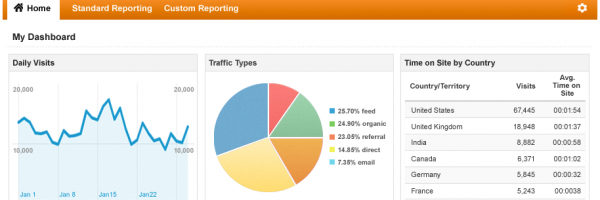
If you are a small business owner with a website, you should be looking at your website analytics data regularly.

Here are some metrics that I recommend most Google Analytics newbies get the hang of to begin getting the basic understanding of their website performance and visitor behavior.

Bounce Rate

This is perhaps, one of the most important metrics for your website. Simply put, Bounce Rate (BR) refers to the number of single page visits. In other words, if the user didn’t click any further into your website upon arrival then that counts as a Bounced visit and Bounce Rates are expressed as percentages.

A high Bounce Rate is usually indicative of design (as opposed to usability) issues of a website. With just under 3 seconds to convince a new visitor to remain on your site, being able to tell your new visitors what your site is all about and what they can expect there needs to be an intuitive process.

For most small business websites, a low Bounce Rate can be anywhere between 20 – 40%.   However, for the purposes of evaluating your website’s performance, it’s important to take other metrics (talked about below) into account as well, because Bounce Rate % on it’s own can be sometimes misleading. For example, news websites and blogs usually have a BR as high as 80% as most users visit the site to get an update on news headlines with only a minority staying to read further.  A high BR in this case isn’t necessarily a bad thing.

Similarly, your own website’s contact page may have a high BR but this could simply mean that visitors leave that page once they have the necessary contact information.

For more on Bounce Rates, check out – What is your website’s Bounce Rate?.

Boost your online sales with Flow20’s expert eCommerce SEO and Bing PPC services! Get ahead with Google Ads and master your campaigns with our Google Ads training. Click here to maximize your reach and revenue today!

Referral data

Another important metric to watch out for is the referral traffic – where your visitors come from and who sends them (If you are involved in any form of Search Engine Optimisation, this is perhaps the most important metric in that case).

To get here, click on Traffic Sources > Overview  from menu on left. You’ll see a list of keywords towards the bottom right of the page. Click on ‘view full report’

If you are using Google Analytics, you’ll generally find 3 types of referral data

  • Keywords  – this helps you understand the search terms visitors have used to find your website.  Not only can this be invaluable in directing your SEO efforts, by combing your knowledge of Bounce Rates with keyword data, you can begin to determine the quality of keyword traffic and which keywords and search terms are bringing you the highest quality of traffic
  • Referrals – another useful piece of information is to know which other sites, blogs and online properties are sending traffic your way
  • Direct  – the % of direct traffic can also be an indicator on how well your marketing efforts are working.  Generally speaking, direct traffic is good – these are visitors who have most likely entered your URL directly (or clicked on your URL elsewhere). Quality of direct traffic and visitors is usually high

Maximize your law or finance firm’s potential with Flow20! Our specialized SEO for law, SEO for finance, and PPC for law services are designed to elevate your online presence. Click here to start dominating your industry today!

Time on site

Once you have taken the necessary steps to reduce your bounce rate, your next focus should be on how you can increase the amount of time a visitor spends on your website.   Similar to the offline world, the longer a visitor spends on your (virtual) shop, the higher the chances of a sale or enquiry being made.

For ways on increasing time on site, check out How much time does your website visitor spend on your website? Or check out our related presentation on Slideshare – Why average time on site is an important analytics metric

Site content > All pages

If you use Google Analytics, then this is a metric I use quite often for client sites as well as ours. All pages gives you the overall performance of your website pages.  From Bounce Rate to time on site to keyword data and exit % , I find this to be a very easy way to find bottlenecks within websites, which pages aren’t working and which one needs improvement.  The sort function is especially useful for this.

If you’re looking for a digital marketing agency why not give Flow20 a try? We can help you with PPC management, Facebook ads, LinkedIn Advertising and Social Media campaigns and even Google Ads training.
August 8, 2013

How to calculate your return from your AdWords campaign

For new businesses, there aren’t many tools out there more effective in getting potential customers quicker than a Pay Per Click (PPC) advertising platform such as Google AdWords or Bing Ads.

A common oversight we find with clients who are start-ups or new to AdWords is that they don’t determine the potential return on investment they can expect from a PPC campaign and in fact, if PPC is even the most cost-effective way to grow their business (with PPC costs going up all the time,  it’s not uncommon for other advertising channels such as Search Engine Optimisation (SEO) or Social Media to be more effective for certain types of businesses).

So, here’s a simple spread sheet that we use internally as well as for clients which can help get at least an overview on what sort of return you can expect.

ppc profit calculator

Lets look at it in more detail:

Budget

It all starts with the budget. Once you have clearly set your budget you can start breaking down the various metrics of the PPC campaign all of which will play a part in how much return you can get.

Cost Per Click (CPC)

Before you begin, get an idea of how much the CPC rates are for the keywords you are going to run your ads against. Google keyword tool allows you to do this or you can use an external tool such as Wordstream.

Keyword cost data, even that provided by Google isn’t 100% accurate so we always advise increasing the estimated CPC by 10% to be on the safe side.

Boost your online sales with Flow20’s expert eCommerce SEO and Bing PPC services! Get ahead with Google Ads and master your campaigns with our Google Ads training. Click here to maximize your reach and revenue today!

Clicks

Once you have your budget in place and the CPC,  getting the number of clicks is easy (budget / CPC).

Lead conversion rate

This is where the fun begins! You want to be able to forecast how many leads or enquiries you could get from your PPC campaign and the best way to do this is looking at your historical website data. If your website is new or you have never tracked conversion rates before,  then we suggest assuming a conversion rate between 2-3%, the average conversion rate of most websites.

It’s easily possible that you experience or have much higher conversion rates and this is especially true if your website is well laid out, easy to use and you offer something niche. If you have these facts beforehand, then by all means, increase your conversion rate to a more real value. However, for those who don’t have this info, a 2-3% conversion rate is safe to assume, we find.

Enquiries

So, now you have your conversion rate and the no of clicks. Divide the number of clicks with the conversion rate and what you have is the approx.. no. of enquires you can expect to get via your campaign.

Sales conversion rate

This is going to be more challenging to get right if you don’t have this data from before. Basically, you want to be able to determine what percentage of those enquiries you think will convert into sales.  There’s no data available for this as this will vary quite a bit depending on various internal factors such as , how competitive your pricing is perceived to be (especially if you don’t display this on your website and is only available to view upon request), how persuasive your sales pitch is to the lead, how efficiently your sales queries are handled and so on…

If you have absolutely no idea, a safe number to assume might be anywhere between 20 – 30%. i.e 1 out of 5 (20%) enquiries will turn into a sale.

Maximize your law or finance firm’s potential with Flow20! Our specialized SEO for law, SEO for finance, and PPC for law services are designed to elevate your online presence. Click here to start dominating your industry today!

Sales & Average order value.

Once you have the sales conversion rate, you’ll be able to determine the no. of sales. You will have an  idea of your average order value and when you multiply this with the sales, you get the sales figure from your PPC campaign.

Costs

Along with taking into account the cost of producing the goods or service, you want to also minus your ad spend for that time period and what you’ll be left with is the net profit from your PPC activity.

We hope you find this useful. Feel free to ask a question or drop us a comment if we can help further.

If you’re looking for a digital marketing agency why not give Flow20 a try? We can help you with PPC management, Facebook ads, LinkedIn Advertising and Social Media campaigns and even Google Ads training.

google-adwords logo August 7, 2013

Ways to increase AdWords Click Through Rate (CTR)

AdWords and Pay Per Click advertisers are generally obsessed with lowering Cost Per Click (CPC) and increasing Click Through Rates of their ads.

Whilst increasing CTR is important to improve the overall performance of your campaigns, a high CTR is by no means going to determine something much more important – what your ad visitors do after they have clicked on your ad. In other words, the ultimate Return on your Investment.

With this in mind, lets look at some ways to increase your CTR without compromising your ad quality or return.

Use ad extensions

AdWords allows you to link different parts of your website via site links which can all become part of the same ad.

This is a very useful tool and can go a long way in increasing your CTR.  Not only does it give you many more opportunities to grab the attention of your ad viewers but also gives them a chance to dive right in to the part of your website they’re looking for.  If you’re not using ad extensions, you want to give this a try today!

Use geo-location targeting

Whilst you can increase CTR without using this, in my experience, I have found this to be one of the most useful features of AdWords. If your business offers it’s services or products to customers only across a certain region then when you combine the usefulness of geo-location along with creating campaigns with targeted headlines,  your CTR can get a significant boost.

Boost your online sales with Flow20’s expert eCommerce SEO and Bing PPC services! Get ahead with Google Ads and master your campaigns with our Google Ads training. Click here to maximize your reach and revenue today!

Make your ad stand out

Some ways you can do that:

  • You shouldn’t even think about launching an ad campaign without checking what the competition is doing first. You can start thinking about standing out once you know what others are doing and unless you’re not checking other ads appearing for your target keywords, there’s no real way of doing this
  • Use symbols where possible. E.g. symbols for registered and copyright
  • Use a combination of upper, lower and sentence case
  • Try a crazy ad variation. If all your ad variations are ‘fact-based’ try one that’s completely conceptual, perhaps even funny and downright crazy!

Use negative keywords

This is another simple but very effective tool to improve your CTR as well as reduce the amount of wasteful clicks. Negative keywords are simply keywords or phrases that you don’t want your ads to appear for. This will vary depending on what it is that you sell but common examples are “job”, “free” and so on…

Use promotions, special offers and call-to-action

What do you think are the most effective types of ads in radio advertising? Time sensitive special offers. In fact, next time around, pay attention to ads you come across on the radio and there’s a pretty good chance, many of them talk about a special offer ending at a certain date or an event that’s coming up.

There’s no reason you cant try the same thing in your PPC campaigns. For example, if you’re selling Nike shoes, why not try an ad for an item that you currently have on special offer?  Mentioning the price as well as when the offer ends can seriously improve your CTR. Not only that, but you should also benefit from a lower CPC for ads like this which means that your ROI here can actually prove to be much higher than your campaign overall.

Elevate your legal or financial services with Flow20! Utilize our expert SEO for law and finance along with our proficient Law PPC strategies to boost your firm’s online profile. Click now to begin leading in your field!

Don’t forget to supplement your ads with clear instructions on what it is that you wish for your users to do. Knowing what your conversion goals are would be useful here. For example, if you’re an accountant, then perhaps, you wish for the user to make an enquiry or an appointment in which case your ad should say so. If you’re offering a free trial, let your audience know that they can get that free trial by clicking on the ad. Whatever your conversion goals are, it’s important that these are in sync with the said ad groups.

If you’re looking for a digital marketing agency why not give Flow20 a try? We can help you with PPC management, Facebook ads, LinkedIn Advertising and Social Media campaigns and even Google Ads training.

Why am I not getting any / many enquiries in spite of page 1 rankings?

If you are already ranking on page 1 within the Search Engine Results Page (SERP) but not getting any enquiries, you may find some comfort in knowing that you aren’t alone.

Having spoken with countless clients over the last 6 years that I have been carrying out SEO, I have found this one of the most common complaints from clients who have either carried out SEO themselves or used a SEO company that they weren’t happy with.

Getting to Google’s page 1 is only winning half the battle. The other half is being able to monetize the newly found visitors – whether that’s an immediate sale or a lead which has some prospect of ultimately converting into one.

So how do you ensure that you make any money from your SEO efforts? By taking a very close look at your SEO strategy and your website.

Let’s take a closer look!

Reason #1 – your SEO efforts isn’t going to give you any return if you are ranking on page 1 for the “incorrect” terms.

The keyword here is incorrect. Not irrelevant.

Time and time again, new clients come to us saying that they are ranking on page 1 for some very appropriate terms but it isn’t generating any enquiries.  Upon further investigation, I usually find that although the client may in fact be on page 1 for relevant search terms, there is a disconnect on the level of relevance by the client’s point of view vs. the website visitor.

Take the example of a window cleaning company that came to us recently with this problem. They were ranking on page 1 for ‘window cleaning london’ but not generating many enquiries.  Now you may think why is that since this search term seems pretty relevant. However, once I looked at their website, I found that the site was heavily focused towards serving the needs of business customers rather than private individuals.

Their home page hardly had any mention of serving private clients and the design as well as the text and images was all geared towards generating enquiries from businesses which was alienating private clients.

Boost your online sales with Flow20’s expert eCommerce SEO and Bing PPC services! Get ahead with Google Ads and master your campaigns with our Google Ads training. Click here to maximize your reach and revenue today!

So what’s the solution here?

The “correct” search terms in this case would be commercial window cleaning, window cleaning contractors, commercial window cleaning company and so on.  These are the kind of search queries that would be used by companies, the kind that the client in question is seeking and the look and feel of the website would much better resonate with these corporate clients.

The takeaway here is that take a good look at the search terms you are currently ranking for and whether it is generating the right kind of traffic as per your business needs.

A scientific way to do this would be to look at your keyword data within Google Analytics – by looking at the quality of traffic, in terms of Bounce Rates, time on site and exit rates of the various search terms generating traffic; you should have a better idea of which search terms are suitable for your website.

Reason #2 – you are expecting too many enquiries from search terms search terms volume examplesthat aren’t competitive enough.

When I say ‘competitive’ I’m talking about the search volumes of each search term generating any traffic for your website. And I’m talking about short-tail queries not long-tail.

Each search query usually has some search volume – the number of people each month that type out that search term (you can get an idea using Google’s Keyword Tool)

To estimate just how many enquiries your SEO efforts should be generating in the first place, you should take into account, each search term’s search volume (I usually use the ‘Exact’ match option in Google’s keyword tool as that’s the worst case scenario), the expected Click Through rate % depending on your ranking  and the possible number of enquiries depending on your website’s conversion rate.

Elevate your legal or financial services with Flow20! Utilize our expert SEO for law and finance along with our proficient Law PPC strategies to boost your firm’s online profile. Click now to begin leading in your field!

Once you know these numbers, you can safely make some assumptions on what the realistic number of enquiries is.

Reason #3 – your website may be letting you down, not the SEO

If you are sure that you are ranking for the correct search terms and being reasonable in your ROI expectations from the SEO, another reason may be that your website is letting you down.

Earlier I gave the example of the window cleaning company’s website tailored to corporate clients whilst the SEO strategy wasn’t. The website just wasn’t saying the right things to encourage a conversion.

Take a closer look at your own website and think about whether it’s making similar mistakes?  If you are offering a service, are you providing enough essential information to help encourage users to get in touch with you? If you are offering a product for sale, are you giving all the necessary information and/or specification about that product to convince a user to part with their money? This is especially important where you are selling non-mass produced or own-branded goods.

When was the last time you compared your website to that of your competitors and made any improvements to yours?

Although the list of improvements you can make to your website is almost endless, for the purposes of this discussion and to improve your ROI from SEO or generate more enquiries, some should be more obvious for your website than others.

For example, in highly specialised business 2 business services, it’s common for business to have a section dedicated to the publication of blogs, resources, whitepaper and so on as it demonstrates the company’s ability within that field – important for securing new business.

Whilst this may not be the case with you,  if some sort of value-added offering is commonplace in your industry, whether that’s publication as mentioned above, training or something else, then you should consider offering this if you aren’t already.

As small business owners, we are often too close to our website to be able to evaluate objectively which is why the help of a family of friend can be invaluable in improving your website.

At the very least, you can ask them to use your website and tell you what they like, they don’t and what they would change. Or, you can try out an inexpensive usability testing service such as usertesting.com or feedbackarmy.com which can give you insights into weak areas of your website and suggestions for improvement.

I hope you find this post useful and helps you in growing your business from your SEO efforts. Here’s another good article about why you may not be getting any enquiries even though you have rankings.

If you’re looking for a digital marketing agency why not give Flow20 a try? We can help you with PPC management, Facebook ads, LinkedIn Advertising and Social Media campaigns and even Google Ads training.

If you need help or have a question, feel free to contact me at shirish@flow20.com

Mobile vs responsive web design

It’s all about giving your customers the most optimized and convenient experience your web site can provide. After all, if your visitors aren’t enjoying their experience, they won’t stay long.

Boost your online sales with Flow20’s expert eCommerce SEO and Bing PPC services! Get ahead with Google Ads and master your campaigns with our Google Ads training. Click here to maximize your reach and revenue today!

So what’s the difference between mobile and responsive web design?

Let’s take a look…

Mobile Web DesignA mobile website is a copy of your website that has been converted to a smaller and easier to navigate form using a separate URL and is the ultimate in convenience for your on-the-go customer.


Responsive Web Design Responsive Web Design is simply a code that is applied to your existing website. With this design your website automatically adjusts to the screen size of any device using the same URL.

A few advantages and disadvantages of each design:

  • Mobile Websites use a separate URL
  • You are virtually maintaining and updating two separate websites.
  • Works better than websites on smart phones since they are tailor-made for small devices
  • A mobile website can be accessed anywhere, any time.


  • Uses the same URL for mobile, desktop, and tablets.
  • Only one site to maintain
  • Is optimized for search engines
  • Automatically adjusts to every mobile browser.

Elevate your legal or financial services with Flow20! Utilize our expert SEO for law and finance along with our proficient Law PPC strategies to boost your firm’s online profile. Click now to begin leading in your field!

Conclusions:

A responsive web design is a more advanced way to make your site mobile-friendly and makes your website look great no matter the device it is being viewed on.

Because more and more people are using mobile web  to access email, social networks, search and more, creating a browsing experience optimized for mobile makes sense.

For further reading, check out the 10 Facts about Mobile SEO article,  or our websites pages on Mobile, Responsive and Web Design.

If you’re looking for a digital marketing agency why not give Flow20 a try? We can help you with PPC management, Facebook ads, LinkedIn Advertising and Social Media campaigns and even Google Ads training.

10 facts you need to know about mobile SEO

You’ve probably heard this a million times before.. Mobile web usage is on the rise.  This means that making sure your website is found on the mobile web isn’t a luxury anymore but absolutely crucial.

Here at Flow20, we have invested a significant amount of time and resources into building and refining our mobile SEO offerings so your business can be seen by a larger audience.

Boost your online sales with Flow20’s expert eCommerce SEO and Bing PPC services! Get ahead with Google Ads and master your campaigns with our Google Ads training. Click here to maximize your reach and revenue today!

If you are new to the world of Mobile SEO, here are some facts to help you get started:

  1. Mobile SEO ensures that your visitors readily find your listings or mobile website while browsing from their smartphone for your niche keywords.
  2. The top industries currently benefiting from mobile search are: Travel, Business and Entertainment industries.
  3. Mobile searches are largely local in nature (3 out of 5 mobile searches are for local businesses)
  4. Google has a separate index for mobile content so if your site isn’t mobile optimised, chances are that it isn’t indexed. (Here’s a useful post on this from the official Google Webmaster blog)
  5. The bounce rate for sites that don’t have a mobile version or an optimised mobile version landing page is over 75%.
  6. Be aware that when you set up your mobile SEO campaign that Google considers iPads as mobile devices.
  7. A mobile app does not have the SEO value and benefits that a mobile website can.
  8. Effective mobile optimisation ensures your website is mobile ready.
  9. Standard search engine optimisation is very different from mobile SEO in the length of the title being less than 55 characters plus there are fewer keywords used.
  10. Mobile SEO does not require significant changes compared to your desktop SEO.

If you are interested to learn more about how Mobile SEO can help grow your business and increase your market share, please don’t hesitate to get in touch with us.

If you’re looking for a digital marketing agency why not give Flow20 a try? We can help you with PPC management, Facebook ads, LinkedIn Advertising and Social Media campaigns and even Google Ads training.

4 tips for writing mobile website text

If you already have a mobile website, you’ll know that the information needs of your mobile users are very different to your desktop users. If you don’t have one already, this article should help you generate effective mobile website copy-writing.

Mobile users visit your website with a very clear goal in mind and nature of the visit tends to be short and thin.  Whilst website copy writing can make or break any website, this is not true anywhere else more than for mobile websites.A well written mobile website copy can have a significant impact on your mobile website’s conversion rate and ultimately, on your mobile protery’s Return on Investment.

Before you begin generating your mobile website content, whether yourself or via the help of a profesisonal copywriter, here are some tips to bear in mind:

Boost your online sales with Flow20’s expert eCommerce SEO and Bing PPC services! Get ahead with Google Ads and master your campaigns with our Google Ads training. Click here to maximize your reach and revenue today!

1.  Start with identifying the purpose of each mobile page

Unless you’re an E-commerce business, you’ll only need a few pages for your mobile website. The obvious ones are Home, About us, Contact/Location. This will of course vary depending on the nature of your business. For example, if you’re a restaurant, you’ll want to have a menu page and perhaps, an online ordering page and maybe, even a online reservations page.  If you’re a builder, you’ll also want a Services page and perhaps another one for prices. You get the picture.

Once you have a sitemap in place, identify the reason(s) a mobile visitor is likely to visit that page and how their intentions will vary for the same page, depending on whether they are visiting your mobile vs. desktop version. For example,  in the event of a desktop visit to your Services page, its likely that the visitor wants to know which services you offer,  get  a little more information on what each one is and whether its suitable for them and perhaps get an idea of prices.  If they find this appealing, they’ll visit other pages on your website and ultimately (hopefully) get in touch.

A mobile visitor to the same page will most likely have a different goal in mind : Get an overview of the services you provide, an idea of prices if possible and get in touch.

2. Create website content (text) to help fulfil goals. As quickly as possible

As with the example above, it should be immediately clear that there’s absolutely no need to bombard the user with tons and tons of text as a) its very unlikely that they are going to read it all and b) this can have a very real negative impact on your mobile conversion rates (unlike desktop websites, its a little more difficult or the user to simply go to another page on your website in the hope that they’ll find something there more useful).

On a mobile website, Less is almost always More. Try to limit your content to 75 – 100 words.

3. What’s above-the-fold?

In the age of varying mobile handset screen sizes, orientation (portrait or landscape) and resolution, its difficult to determine what areas of your content will display above the fold.  This will almost vary depending on the handset, user view settings and even browser. However,  80 – 90 words is usually a good indication as to the amount of text that will display above the fold.

With this in mind, you should aim to prioritize the textual content of your mobile website and ensure that the most relevant information is within the first 90 words.

Elevate your legal or financial services with Flow20! Utilize our expert SEO for law and finance along with our proficient Law PPC strategies to boost your firm’s online profile. Click now to begin leading in your field!

4.  Headlines and headings are very important elements of mobile website copy writing

Mobile users will often scan the text on a mobile website so its important to keep your headlines and headings as descriptive as possible. The more meaningful information these can convey, the less time the user has to spend trying to fulfil the purpose of their visit.

I hope you find this post useful.  My most important recommendation would be that if you want to produce the perfect copy for your mobile website,  start first with a clear understanding on what the goals of your mobile visitors are.  Once you know this, you can implement writing best-practices, like some of the ones mentioned above to determine the best way your mobile website content can serve their needs.

If you don’t have a mobile website yet and thinking of getting one built, check out our Mobile Website Design in London page.

If you’re looking for a digital marketing agency why not give Flow20 a try? We can help you with PPC management, Facebook ads, LinkedIn Advertising and Social Media campaigns and even Google Ads training.